- Home
- Documentation
- Sensedia Developer Portal
- Release Notes
2026
Improvement
-
Additional information in developer registration
When you create your Developer Portal account, you can fill in additional information defined for the portal, such as company, phone, and document. The fields appear in the configured order, with optional fields marked, and the most common ones appear in the language you are browsing in. A field can have a defined format, such as numbers only, and the registration is only completed with a value in that format. The values are available to the portal administrator in the Portal Manager, under Consumers > Developers, in the developer's Additional Information section. Portals without configured additional information keep the same registration as before. Learn more in Authentication.
NOTEAvailable on the Standard plan and above. The fields are configured by Sensedia: to add or change a field, talk to your CSM.
Fix
-
Empty API list when creating Apps
When you created an App, the list of available APIs could open empty, with a no results message, even when the gateway had APIs enabled for App registration. This happened when the first APIs in the catalog, in alphabetical order, did not accept App registration, and the enabled API only showed up when you typed part of its name in the search. The list now shows, as soon as it opens, the gateway APIs enabled for App registration that you can see, and pagination goes through those APIs only.
Improvement
-
Additional information when creating Apps
When you create or edit a Sensedia connection App in the Developer Portal, you can fill in additional information defined for the portal, such as the owning team, the usage environment, and the integration purpose. The fields appear in the configured order, with help text and a required marker, in the language you are browsing in. The values are sent to the API Manager in the App's extra fields and are available for approval and to the APIs. With automatic approval turned off, a change to these fields in an approved App goes through approval in the Portal Manager, which shows the current and the requested value of each field. In Apps created from this release on, editing, approving, rejecting, or cancelling the App through the portal no longer erases the extra fields it already had in the API Manager. Earlier Apps get this protection after Sensedia loads their data into the portal. In API Manager v4, a field added or changed directly in the API Manager after that is still overwritten the next time the portal acts on the App. Learn more in Developer Portal - Apps.
NOTEAvailable on the Standard plan and above. The fields are configured by Sensedia: to add or change a field, talk to your CSM.
Fix
-
Passwords longer than 16 characters in sign-up and password reset
Sign-up and password reset silently cut passwords longer than 16 characters, so signing in with the full password failed. Passwords can now have up to 32 characters and are saved in full. A password above this limit is rejected with an error message.
If you set a password longer than 16 characters before this fix, reset your password.
Improvement
-
Direct link to an operation in the API documentation
You can now link to a specific operation in an API's documentation, using the format
/catalog/<api>#/<tag>/<operation>. When the link is opened, the operation is expanded and the page scrolls to it. Expanding an operation updates the browser address with its link, which can be copied and used in Guides and any other content. A link to a tag (#/<tag>) takes the reader to the start of that tag.
Fix
-
Portal Manager role selector now lists all roles
In portals with more than 20 registered roles, the Portal Manager role selector showed only the first 20, and the remaining roles could not be assigned through the interface. The selector now offers every role in the portal, in alphabetical order, on all screens that assign roles: API Settings & Permissions, Guides, FAQ topics, and Products.
Fix
-
Activity Monitor now shows calls from all environments
We fixed an issue where the Activity Monitor stopped showing calls from environments created after the portal's initial setup. In these cases, the screen appeared empty, as if no calls had been recorded, even though the data existed. The Activity Monitor now shows calls from all your environments by default, including the ones you create from now on. You no longer need to ask support for an adjustment.
NOTEIf your portal has an environment restriction configured, the Activity Monitor continues to show only the environments defined in it.
Improvement
-
Notice when an operation takes longer than expected
When an operation in the portal exceeds the time limit, you now receive a notice explaining that it may have been completed and advising you to check the result before trying again. Previously, a generic failure message was displayed or, in some cases, technical code (HTML) appeared inside the error message.
IMPORTANTAn operation that exceeded the time limit may still have been completed. Before repeating the action, check the result (for example, the Apps list) to avoid creating duplicate records.
Improvement
-
Portal Manager with the new Design System
The Portal Manager now follows the Sensedia Platform Design System, the same one used by the other products in the platform. The update covers the API Catalog, Products, Content Management (Guides, FAQ, and File Repository), Portal, Consumers (Invitations, Developers, and Apps), and Settings screens, with standardized components and interactions for a more modern and consistent experience.
All features remain the same and no action is required on your side. The Developer Portal your developers access does not change: the update applies to the management interface.
Improvement
-
Strapi updated to version 5
We have completed, across the whole base, the update of Strapi, the CMS behind content management in the Developer Portal, from version 4 to version 5. The portal now runs on a version with active vendor support, which keeps receiving fixes and improvements.
The update was delivered with a compatibility layer and requires no action on your side: the Portal Manager screens, the content publishing flows, and the existing integrations keep working as before, with no changes to the portal API contracts.
Improvement
-
Titles over the Catalog and Apps banners can now be hidden
The "Catalog" and "Apps" texts were drawn over the banner of those screens in a fixed way, even when the banner artwork already carried the title. Displaying these titles is now configurable, which lets you use the whole banner with no system text on top of it. The app detail and app form screens keep showing their own titles.
The setting is applied by Sensedia at the customer's request. To hide the titles in your portal, open a support request.
Improvement
- We improved table editing in Guides: you can now add and remove rows and columns directly in view mode, through the editor toolbar, without having to switch to source mode.
Fix
-
Registration and login no longer treat uppercase e-mail differently
When an invitation was sent to an e-mail containing uppercase letters, the developer completed the registration and received the approval as usual, but could not access the portal afterwards, not even by typing the address entirely in lowercase. The e-mail is now normalized in the invitation, registration, login, and password change flows, so uppercase letters in the address no longer block access.
New Feature
-
Artifact and resource management in the Developer Portal
You can now upload supporting files to the File Repository and associate them with APIs, Guides, and FAQ questions. With this, the Developer Portal brings together, in one place, the API documentation and the materials the technical team needs to consume and integrate.
What's available:
- Upload supporting files: Collections, SDKs, specifications, images, and documentation in
png,jpeg/jpg,svg,webp,gif,pdf,json,yaml/yml, andtxtformats. - Centralized management: search, replace, download, and delete files, and see where each one is used.
- Association with APIs, Guides, and FAQs: link files to content so they are available for download in the Developer Portal.
See more information in File Repository.
IMPORTANTThe File Repository is a premium feature and is not included in the Basic plan. Each upload accepts up to 50 files or 3.3 MB per batch, and storage is limited to 500 MB per client.
- Upload supporting files: Collections, SDKs, specifications, images, and documentation in
New Feature
The Developer Portal now includes the File Repository feature, which allows you to upload, manage, and associate files for use in Guides. This enables you to reuse files across different content and have greater control over storage consumption.
Check out more information on the File Repository page.
Improvements
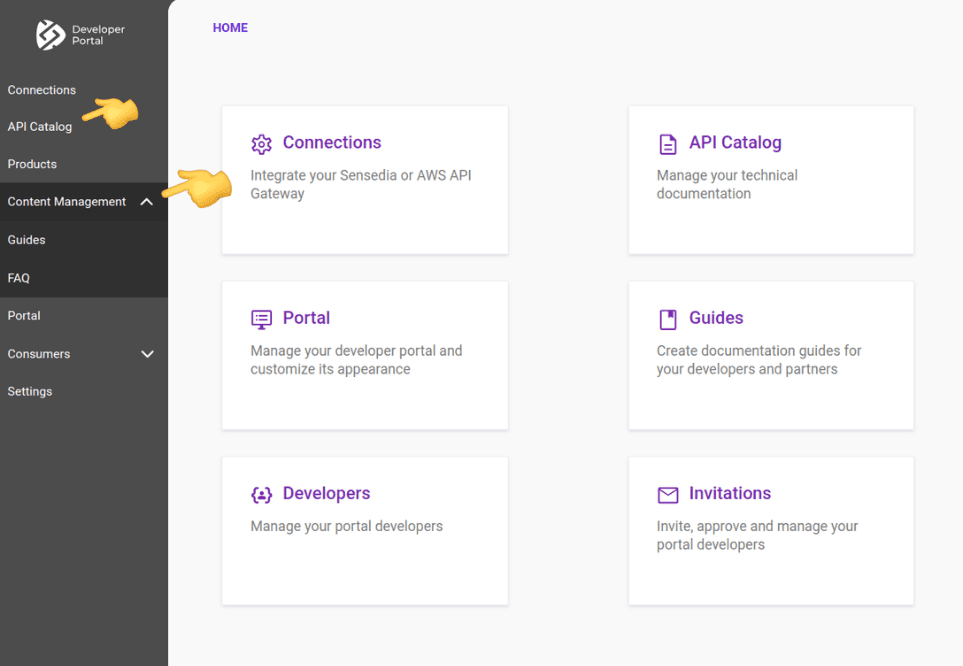
- Renaming of screens and menu aggregation We renamed the API Docs screen to API Catalog to better align with the API Catalog concept. We also implemented the Content Management aggregator, which brings together the Guides and FAQ menus in a single location, making it easier to access and organize content.
- Automated migration We implemented an automated update process for customers migrating from Sensedia API Platform version 4.x to Sensedia API Management 5.x. Now, the integrations that feed the Developer Portal are migrated seamlessly, preserving authentications, configurations, and data history without the need for manual adjustments.
Bug Fix
- We fixed an issue related to editing Sensedia (API Management 5) connections: when changing the Client ID and/or Client Secret, the Developer Portal did not remove or update the old access token. As a result, the portal continued attempting to use a token linked to possibly revoked or obsolete credentials.
Improvement
- We implemented a bidirectional synchronization logic for app statuses, ensuring that any changes made by administrators are automatically reflected in both the Developer Portal and API Management. For example, when an app is deleted in the source gateway, it will also be removed from the Portal Manager and Developer Portal, and the consumer will be notified about the access revocation.
2025
Improvement
- Authentication Now, the available authentication methods — email login or SSO (Microsoft Entra ID and Keycloak) — are automatically displayed or hidden according to the client's security policies.
New Feature
- Support for HTTP API Import (AWS HTTP API Gateway v2) The Developer Portal now allows you to import HTTP APIs (AWS HTTP API Gateway v2), in addition to the existing support for REST APIs (AWS REST API Gateway v1). This improvement expands the portal's compatibility, making it easier to manage and integrate different types of AWS APIs in a single environment.
Bug Fixes
-
We fixed an issue that caused breaks in the Activity Monitor and API Status menus for customers who do not use Sensedia API Management as their API provider. Since these menus depend on data from the Sensedia provider, we added a message informing that no data is available, either due to the absence of a connection with Sensedia or because the configuration has not yet been completed.
-
(Strapi) We fixed an issue that caused data inconsistency when trying to create a revision with invalid information. The 400 error was thrown after updating the catalog revisions, without executing the necessary rollback.
-
(Strapi) We fixed an issue that created duplicate environment records when trying to register an already existing environment.
New Features
-
Role Assignment for Guides You can now assign specific roles for each guide displayed in your Developer Portal. Roles control the visibility and access to guides, allowing administrators to manage permissions in a granular way. This ensures greater security and improves the user experience, ensuring that each person views only the authorized content according to their role. See more information at Role Assignment.
-
Email Notification Customization Administrators can now customize emails sent to Developers and Apps directly in the Notifications tab on the Portal screen, aligning communication with the company's visual identity. You can configure the company logo, email title, and email body. NOTE: Notification customization is available for Premium plan customers. For more information, contact your account manager. See more information at Notifications.
Bug Fix
- We fixed an issue with new user registration: now, success or error messages are clearly displayed, preventing duplicate attempts and confusion.
Improvement
- Product Publishing from the "Products" Menu Product publishing in Portal Manager now occurs directly from the Products menu. You can publish a product at the time of its creation, making the process faster and consistent with the usability of other resources, such as APIs and Guides. The publishing option is no longer available in the Portal menu.
Improvement
- Advanced Content Search in the API Catalog We've enhanced the API Catalog search in the Developer Portal to include keywords from the OpenAPI contract content, such as endpoints and descriptions. This makes it easier to discover APIs, even without the exact name.
Improvements
-
App Approval Control Now you, a Portal Manager administrator, can define whether app creation will be auto-approved or require manual approval. This new option allows you to manage app credentialing for Sensedia API Management, ensuring greater security and governance in the consumption of your APIs.
-
Filter by Provider in the Portal Manager Apps Interface We've added the "Provider" filter and column to the Portal Manager Apps interface. Additionally, we removed the "Credential Status" field and adjusted other interface elements for greater clarity.
Bugs Fixed
We fixed an issue in the Developer Portal Multi-Gateway that, in certain situations, prevented APIs from being listed for selection when creating new apps and products.
New Feature
We've added a FAQ section in Portal Manager. Now you can easily create and manage topics and questions that will then be displayed to developers in the Developer Portal for quick and efficient reference.
Developer Portal Internationalization
With the Developer Portal, developers from different regions can now enjoy a smoother experience. The portal is now multilingual and available in English, Spanish, and Portuguese. You can switch languages by clicking the flag icon in the top right corner of the portal.
Improvement
We have made available an additional access method for developers to your Developer Portal, which now supports SSO (Keycloak) login.
Improvement
In addition to Sensedia, AWS, Azure, and Mulesoft, the Developer Portal now offers native integration with Apigee Gateway, allowing your APIs to be exposed for developer consumption.
Improvement
We added the option for native integration with Mulesoft, allowing you to import and expose APIs directly from the Mulesoft gateway, using the appropriate credentials.
2024
Improvement
- (Strapi) Now available: developer authentication using Microsoft EntraID.
Fix
- (Strapi) Fixed an issue with access permissions to Guides.
Improvements
-
(Strapi) You now have the option to control access to the Guides screen in your portal. Select the Roles that can access it. You can assign roles to developers in API Catalog.
-
(Strapi) We added a screen to notify that the page is restricted when the developer does not have access to the API catalog, API Status, and Apps.
Fixes
-
(Strapi) Fixed the issue that caused an "incorrect username or password" error message when trying to log in after a user's role was deleted and replaced with a default role.
-
(Strapi) Duplicate APIs were being displayed on the App creation screen when AWS APIs were associated with roles.
-
(Strapi) Fixed the SAVE button, which would become disabled after creating or deleting a role.
-
(Strapi) The Products screen was breaking when editing a product that did not exist in Strapi.
Improvement
- (Strapi) Introduced the concept of roles. You can now manage access to your portal by defining roles for developers/users.
Improvements
- We added the secure attribute to portal cookies.
API Status
- (Strapi) We created a new screen for your Developer Portal: API Status. Consumers of your APIs can now check resource availability details for the APIs.
Fixes
-
Fixes implemented in the Developer Portal Strapi:
-
Logged-in users in the Developer Portal were unable to view the Catalog and Apps pages.
-
The Catalog screen layout in the Developer Portal would break when publishing a product with a very large description. This fix was applied to both Strapi and non-Strapi versions of the Developer Portal.
-
Fixed a 404 error when loading the favicon.
-
The restricted area screen was not being displayed for non-logged-in users.
-
Delivery
The Developer Portal integrated with Strapi is now available.
Improvements
-
Created the "Developers" tab in Settings. The auto-approval setting for developer registrations is now in this tab.
-
Revised the ReCAPTCHA component in the password reset and developer registration confirmation forms.
Fix
- Fixed the issue with API names containing special characters.
Fix
- Implemented necessary adjustments for compatibility with Sensedia API Manager version 5.
Improvement
- Adjusted the rule for API deletion. It is now only possible to delete APIs that were manually imported. APIs imported automatically and non-native ones cannot be deleted individually.
Fixes
-
Resolved an issue when attempting to import a custom provider.
-
Fixed a problem when re-importing an API from a non-native connection.
-
AWS Apps listing now only returns native connections.
Improvements
-
You can now send additional information (e.g., tokens) along with AWS app credentials.
-
Added a new element to the AWS App creation and approval flow: the AWS API Key ID field.
Fix
- Fixed an issue that caused an error when removing apps from an AWS API without plans.
Fix
- Fixed an issue that resulted in an error when changing credentials while approving an AWS app modification.
New Feature
- You can now manage AWS Apps, approving or rejecting new registrations.
New Feature
- Created the Consumers > Apps page, dedicated to AWS gateway Apps.
Delivery
First release of the Developer Portal product.