- Home
- ...
- c Healthcare
- c FHIR
c FHIR
The FHIR component enables standardized healthcare data exchange between systems, ensuring interoperability and consistency in communication. It defines a flexible structure based on resources that represent clinical, administrative, and financial entities, enabling standardized communication across different platforms.
URI Syntax: fhir:apiName/methodName
Main fields
Path parameters
Query parameters
Examples
Example 1: querying patient data by ID (api: read)
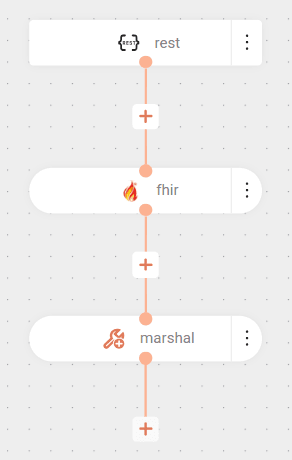
The integration is triggered from a GET request to a specific endpoint.
The request is forwarded to a FHIR server.
The resource type being fetched is Patient and the patient identifier is 596526.
The data returned by the FHIR server is processed by the marshal EIP, which converts the response to JSON format.
Result
Example 2: searching for patients (api: search)
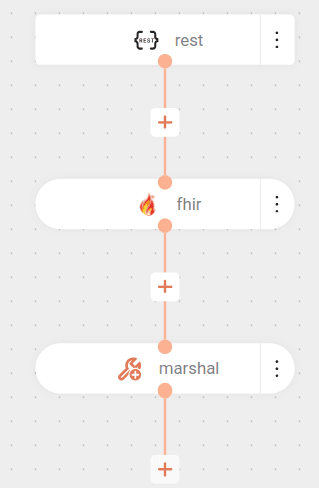
The integration is triggered by a GET request to a specific endpoint.
Upon receiving this request, the flow performs a search on the FHIR server (https://server.fire.ly/r4) for all patients whose last name is “Shakur”.
The result of this search (a list of patients) is converted to the FHIR JSON format, which is an international standard for healthcare data.
This JSON can then be returned to the requester or used in other steps of the flow.
Result
Guidelines for Using the FHIR Component
-
The component's response will be inserted into the Exchange body as a Java object.
- The object varies according to the API and protocol version used.
- For version R4, the object will be in the org.hl7.fhir.r4.model package.
-
To use the object in other components, it must be converted to JSON using the marshal EIP.
- Use the
fhirJsonData Format. - The traditional JSON Data Format is not compatible with FHIR classes.
- Use the
-
Component parameters do not support expressions to obtain a payload from the body.
- For this, use the inBody parameter.
In this example, we are indicating that the resourceAsString parameter should be obtained from the body.
- Expressions cannot be used in any field.
- To parameterize values, use environment variables. Example: