1. Home
  2. ...
  3. t File Storage and Transfer
  4. t Azure Storage Blob Service

t Azure Storage Blob Service

Available triggers

The Azure Storage Blob Service component allows you to store and retrieve large binary objects (blobs) in the Azure Storage Blob service using Azure v12 APIs.

URI Syntax: azure-storage-blob:accountName/containerName

Main fields

Path parameters

Name
Description
Default
Type
accountName(common)Azure account name to be used for authentication in Azure Blob services.β€”String
containerName (common)Name of the blob container.β€”String

Query parameters

Name
Description
Default
Type
credentialType (common)Credential strategy to be used for authentication. Possible values: SHARED_ACCOUNT_KEY, SHARED_KEY_CREDENTIAL, AZURE_IDENTITY, AZURE_SAS.AZURE_IDENTITYCredentialType
operation(producer)Type of blob operation that can be used with this component. Possible values: listBlobContainers, createBlobContainer, deleteBlobContainer, listBlobs, getBlob, deleteBlob, etclistBlobContainersBlobOperationsDefinition
accessKey(security)Access key for the Azure account, used for authentication in Blob services.β€”String

Example

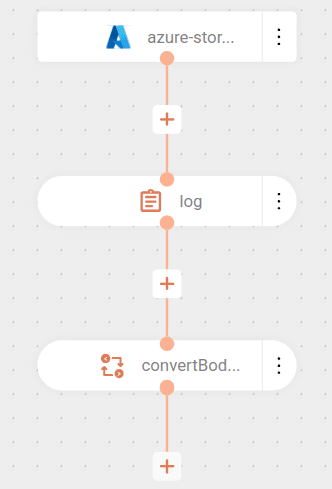
The flow starts by connecting to the my-container container in the Azure account myaccount using the access key provided in a variable. Read about flow variables configuration.

Then, it performs the listBlobs operation, listing the files (blobs) present in the container.

For each file found:

  • Logs the name of the file read.
  • Converts the file content to String type for further processing.
How happy are you with this page?

We use cookies to enhance your experience on our site. By continuing to browse, you agree to our use of cookies.Learn more