- Home
- Documentation
- Integrations
- c Validator - XSD
c Validator - XSD
The Validator component ensures the structural integrity and compliance of data (XML payloads) exchanged in an integration. It intercepts messages that do not conform to the XSD contract, preventing errors in target systems.
How integrations with XSD Validator work
When integrating the XSD Validator into a flow, every incoming XML message is automatically validated against the XSD schema defined in a resource file (see how to create a resource.) If the message is compliant, processing continues as normal. Otherwise, the flow is interrupted and a validation exception is thrown, preventing invalid data from reaching the target system.
This approach ensures that only correct and properly formatted information is processed, increasing the reliability of integrations and making it easier to identify data issues early in the flow.
This allows you to create more robust integration flows that validate data contracts (Schemas) and protect legacy systems and business partners from malformed messages ("Garbage In, Garbage Out").
URI Syntax: validator:resourceUri
Main fields
Path parameters
Query parameters
Example
The flow starts when an HTTP POST request is made to the /validate endpoint.
The received message body is sent to the Validator component, which validates the XML using the sample.xsd resource file.
If the message is correct (according to the XSD), the flow continues as normal.
If the message does not conform to the XSD, a validation exception occurs.
When the exception happens, the flow catches the error and sets the response body to "Failed", indicating that validation was unsuccessful.
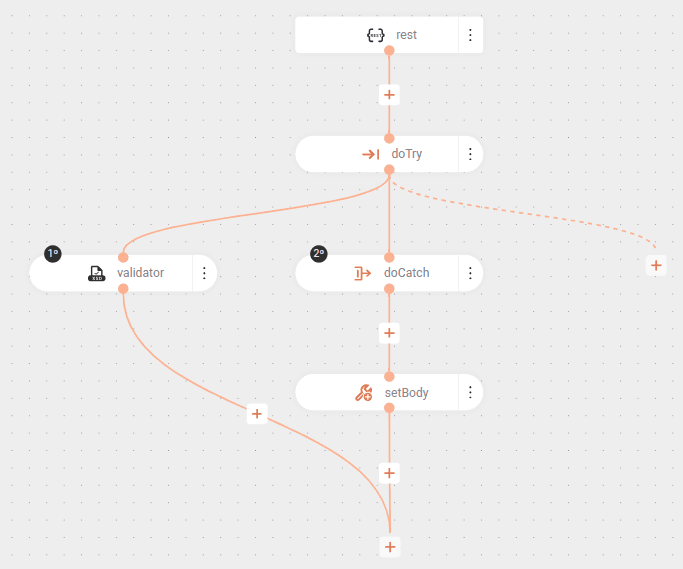
In this other example, the Validator component is used directly in the flow. If the XML does not comply with the XSD schema, a validation exception will be automatically thrown by the component, which can be handled by a global Camel error handler or result in a standard HTTP error:
If the message does not conform to the XSD, the Validator throws a ValidationException and the flow is interrupted.
XSD Schema
See the XSD schema configured as a resource in the example integration:
The XSD schema defines the structure of an XML document for purchase orders (PurchaseOrder).
Here's what happens in it:
- The main element is
PurchaseOrder, which must follow the complex typePurchaseOrderType. PurchaseOrderTyperequires a sequence of elements:ShipTo: shipping address, of typeUSAddress, can appear up to 2 times.BillTo: billing address, also of typeUSAddress.- An attribute
OrderDate, which must be a date.
- The
USAddresstype defines the address fields:name,street,city,state(all strings) andzip(integer).- An attribute
country, which must always be "US".
- The default namespace is http://tempuri.org/PurchaseOrderSchema.xsd.
In other words, the XSD ensures that the purchase order XML follows exactly this structure, validating names, types, and required fields. If the XML does not follow this pattern, it will be rejected by the Validator.