To view the details of an API, access the Discovery screen and click on the icon  , in the catalog item listing.

You can check general information about the API, as well as its revisions and associated environments.
NOTECatalog items may represent APIs originating from different platforms and gateway types, including APIs imported from AWS API Gateway in both REST (v1) and HTTP (v2) versions, as well as other providers supported by the platform.
Here are the panels:
- (A) GENERAL INFO
- (B) ISSUES
- Consistency: Quality Analysis and
- Efficiency: Redundancy Detector
- (C) DOCUMENTATION
- (D) DEPLOYMENTS
NOTEDepending on the Type (category) of the API, some panels and tabs may not be available.
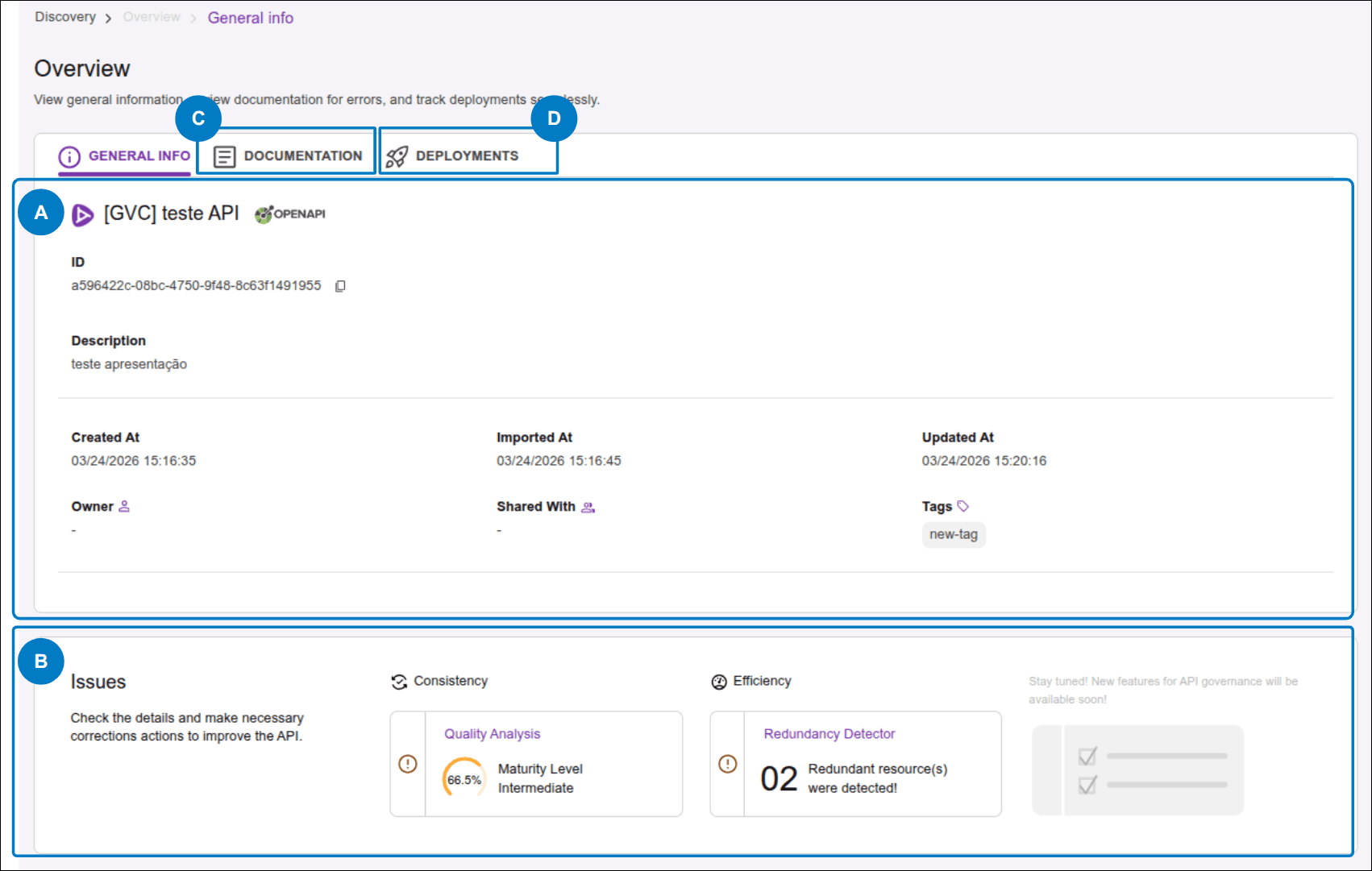
(A) General Info Tab
This panel contains the following information about the API:
- The name, which appears as the panel title;
- ID: unique identifier of the API in the catalog;
- Description: description;
- Created At: creation date and time;
- Imported At: import date and time;
- Updated At: update date and time;
- Owner: responsible user or team;
- Shared with: users with whom the API is shared;
- Tags: associated tags (or labels).
From the Overview panel, you can perform the following actions:
- Change the Owner (user or team responsible for the API);
- Edit Shared with (users or teams with whom the API is shared);
- Add or remove tags.
Change the Owner
 (next to Owner) and select the desired option.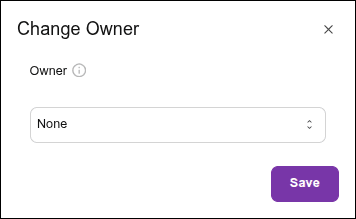
Edit Shared with
 (next to Shared with) and select one or more users or teams.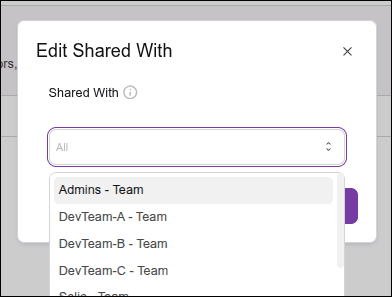
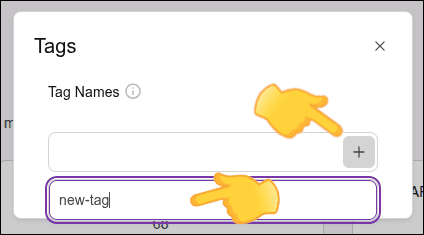
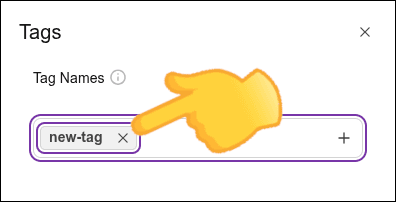
Add or Remove Tags
 to add a tag.
Step 3
Click + and, in the Tag Name field, type the name of the tag you want to associate (new or previously registered).
NOTE
- A tag name must contain at least 2 and at most 30 characters.
- Only lowercase alphanumeric characters and "-" are accepted.
- The tag name cannot start or end with "-".
(B) ISSUES Panel powered by AI
NOTEDepending on the Type (category) of the API, this panel may not be available.
In the Issues panel, you can view the problems detected by AI that may impact the quality of your APIs and the ecosystem. These are elements that can be adjusted to improve aspects such as organization and performance.
-
CONSISTENCY: Quality Analysis: related to the consistency and organization of APIs. It indicates the presence of best practice violations in OpenAPI contracts. It checks whether contracts are complete and consistent, ensuring that development and documentation are aligned with your organization’s rules. The chart represents the API's maturity level. Click Go to issue details to view the full Maturity Report and access the Smart Recommendations.
-
EFFICIENCY: Redundancy Detector: related to resource usage. It highlights redundancies and optimization opportunities. It does not cover performance-related aspects. The number shown indicates how many redundant resources were found. Click Go to issue details to see the full list of redundancies.
IMPORTANTAn empty field in the ISSUES column does not necessarily indicate the absence of issues. After import, APIs must be processed, and the time required to generate Issues may range from a few minutes to several hours, depending on the number of APIs and the size of the imported contracts.
(C) DOCUMENTATION Tab
REST APIs
In this tab, you will find the Maturity Report, API specification and the access button for the Smart Recommendations.
Type Event APIs
For APIs of type Event, in this tab you will find the API specification and its visualization.
The Maturity Report and Smart Recommendations are not available for this API category.
(D) DEPLOYMENTS Tab
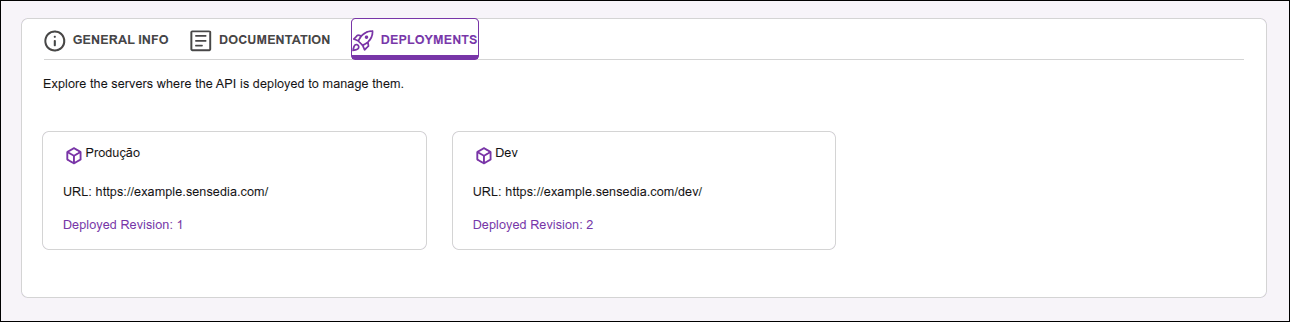
In this tab, you will find information about the environments where the API is deployed.
The display of deployment environments is standardized and provider-independent, based on the technical specifications of the API contract:
- OpenAPI 3.x: information is extracted from the
servers.url(address) andservers.description(environment name) fields. - Swagger 2.0: the URL is composed of the combination of the
schemebasePathfields.
If the contract does not have an explicit description for the environment, the system uses the URL host as an identifier or searches for keywords (such as prod, dev or test) to name the card automatically.
Each card displays the following information:
- Environment name;
- Address;
- Revision number. Click to view the specification, maturity report, and the access button for the Smart Recommendations.
NOTEDepending on the type (category) of the API, this tab may not be available.