---
title: Webhook
description: Implement the webhook used to approve and provision AWS app credentials in Developer Portal.
documentId: developer-portal-webhook
locale: en-US
---
**What is a webhook?**
A **webhook** is a set of REST endpoints that **you, as a Sensedia client, must provide**. When a developer requests credentials, the **Developer Portal** will call this set of REST endpoints. Thus, the developer will be able to access your protected APIs on the **Developer Portal**.
Below is a summary of the communication flow between **Developer Portal** and webhook during the credential request:
### Step 1
**Developer** signs up on Developer Portal.
### Step 2
**Developer** goes to the **Apps** menu and creates a new AWS app (Sensedia API Manager apps do not use webhooks).
### Step 3
**Developer Portal System** makes an HTTP request to the **webhook**, passing information from the **developer's** AWS app.
### Step 4
**Webhook**, in your infrastructure, receives the request, creates the credentials, and returns them in the same HTTP request.
### Step 5
**Developer Portal System** receives the return, records the credentials in the database, and provides access to the **developer**.
## Specification
It is your responsibility to implement the webhook in your infrastructure, but you can consult an [implementation example](/docs/developer-portal/webhook#webhook-implementation-example). **The only requirement** is to follow the contracts of the REST endpoints to carry out the integration between Developer Portal and webhook.
### Open API Specification
To create the webhook, implement the contract below.
Also download the [Open API Contract](https://creative-ball-51b3fc85c0.media.strapiapp.com/credentials_webhook_specification_updated_65f547b32f.yaml) and the [Python example](../assets/CredentialsWebhookDemo-updated.py).
The specification was changed. The optional field `customCredentials` was added, and it can be used with API KEY and CLIENT CREDENTIALS.
## Endpoints
Below are the endpoints you must implement and the details of request and response for each of them.
| Action | Endpoint |
| --- | --- |
| Create credentials | `POST /v1/createCredentials` |
| Update credentials | `POST /v1/updateCredentials` |
| Revoke credentials | `POST /v1/revokeCredentials` |
| Check availability | `GET /v1/health` |
### Authentication
All endpoints will use **basic authentication**. You will receive the header `Authorization: Basic ` and should validate it as you see fit.
### Create credentials
```http
POST /v1/createCredentials
```
Endpoint responsible for creating and returning the app credentials.
**Request**
- Header:
```
Authorization: Basic
```
- Body:
```json
{
"appName": "string",
"developer": "string",
"apis": [
{
"id": "string",
"usagePlans": [
{
"id": "string"
}
]
}
]
}
```
**Response**
- Status code: `200 OK`
- Body:
```json
{
"credentialType": "CLIENT_CREDENTIALS | API_KEY",
"clientId": string,
"clientSecret": string,
"apiKeyId": string,
"apiKey": string
}
```
The response can return either an **API Key** or **Client Credentials**.
For `credentialType=API_KEY`, the fields `apiKeyId` and `apiKey` should be returned.
For `credentialType=CLIENT_CREDENTIALS`, the fields `clientId` and `clientSecret` should be returned.
The specification of `CreateCredentialsResponse` was modified. The optional field `customCredentials` was added to return additional information, such as API KEY and CLIENT CREDENTIALS.
### Update credentials
```http
POST /v1/updateCredentials
```
**Request**
- Header:
```
Authorization: Basic
```
- Body:
```json
{
"updatedAt": "2024-03-01T18:58:47.878561013Z[GMT]",
"appName": "string",
"developer": "string",
"credentialType": "CLIENT_CREDENTIALS | API_KEY",
"clientId": "string",
"apiKeyId": "string",
"apis": [
{
"id": "58baecsdd4",
"action": "NONE | ADDED | REMOVED",
"usagePlans": [
{
"id": "3llq7e",
"action": "NONE | ADDED | REMOVED"
}
]
}
]
}
```
**Response**
- HTTP status: `204 No Content`
- Body: empty
The specification of `UpdateCredentialsRequest` was modified. The optional field `customCredentials` was added to return additional information, such as API KEY and CLIENT CREDENTIALS.
### Revoke credentials
```http
POST /v1/revokeCredentials
```
Endpoint responsible for revoking (effectively disabling or deleting) app credentials.
**Request**
- Header:
```
Authorization: Basic
```
- Body:
```json
{
"appName": "string",
"developer": "string",
"credentialType": "CLIENT_CREDENTIALS | API_KEY",
"clientId": string,
"clientSecret": string,
"apiKeyId": string,
"apiKey": string
}
```
**Response**
- Status code: `204 No Content`
- Body: empty
The specification of `RevokeCredentialsRequest` was modified. The optional field `customCredentials` was added to return additional information, such as API KEY and CLIENT CREDENTIALS.
### Check availability
```http
GET /v1/health
```
Application management endpoint. It must return `204 No Content` if the request is successful. It may return other status codes like `401`, `500` etc.
**Request**
- Header:
```
Authorization: Basic
```
- Body: empty
**Response**
- Status code: `204 No Content`
- Body: empty
## Error Cases
If the webhook returns any error (status code `4xx` or `5xx`), the expected message format is:
```json
{
"timestamp": date-time,
"status": integer,
"error": string,
"messages": [
string
],
"path": string
}
```
## Webhook implementation example
**AWS Lambda**
Below is an example of an **AWS Lambda**, in python, implementing all the endpoints.
The code below is just a **reference**. You should modify it according to your security needs or business rules. The only requirement is to follow the contract defined in the [Open API specification](/docs/developer-portal/webhook#open-api-specification).
To download the example, click [here](../assets/CredentialsWebhookDemo-updated.py).
### Creating Credentials
There are two methods for creating credentials:
- [**API Keys**](/docs/developer-portal/webhook#api-keys-create-example)
- [**Client Credentials**](/docs/developer-portal/webhook#client-credentials-create-example)
#### API Keys
API Keys are generated with the name of the app from the **Developer Portal** and the email of the developer who created the app.
See the example below:
```python
def create_api_key(request_body):
"""Creates a new API Key and associates it with the requested Usage Plans. Return the API Key ID and value."""
client = boto3.client("apigateway")
app_slug = request_body.get("appSlug")
developer = request_body.get("developer")
apis = request_body.get("apis", [])
try:
api_key_response = client.create_api_key(
name=create_credential_name(app_slug, developer),
enabled=True,
# tags={'string':'string'} can be used to distinct API Key created by the webhook
)
api_key_id = api_key_response["id"]
api_key_value = api_key_response["value"]
# Iterate over APIs in the request body
for api_data in apis:
# api_id = api_data.get('id') can be used to verify if API is still related to the Usage Plan
usage_plans = api_data.get("usagePlans", [])
# Iterate over usage plans for each API
for usage_plan in usage_plans:
usage_plan_id = usage_plan.get("id")
# Associate API Key with Usage Plan
client.create_usage_plan_key(
usagePlanId=usage_plan_id, keyId=api_key_id, keyType="API_KEY"
)
return {
"statusCode": 200,
"body": json.dumps(
{
"credentialType": "API_KEY",
"apiKeyId": api_key_id,
"apiKey": api_key_value,
"customCredentials": {
"qaautomation-token-1": "qaautomationtoken1",
"qaautomation-token-2": "qaautomationtoken2",
"qaautomation-token-3": "qaautomationtoken3",
"qaautomation-token-4": "qaautomationtoken4",
"qaautomation-token-5": "qaautomationtoken5"
},
}
),
}
except Exception as e:
logger.error("create_api_key error: %s", str(e))
return handle_error(str(e))
```
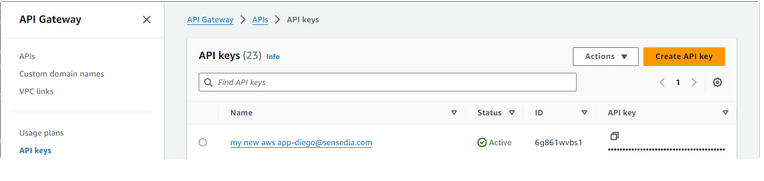
This method should generate a new key in the AWS console:
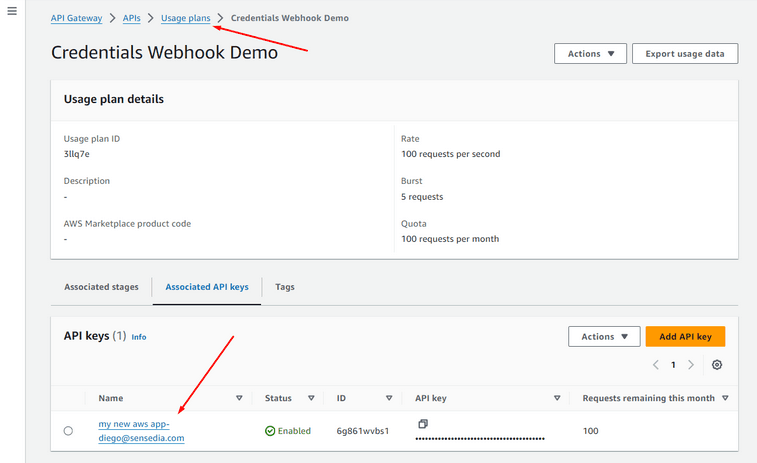
And associate it with the Usage Plans:
#### Client Credentials
Client Credentials are configured by the **App Clients** of a Cognito User Pool.
See the example below:
```python
def create_cognito_app_client(request_body):
"""Creates a Cognito app client and returns the client id and client secret."""
cognito_client = boto3.client("cognito-idp")
app_slug = request_body.get("appSlug")
developer = request_body.get("developer")
try:
response = cognito_client.create_user_pool_client(
UserPoolId=USER_POOL_ID,
ClientName=create_credential_name(app_slug, developer),
GenerateSecret=True,
AllowedOAuthFlowsUserPoolClient=True,
AllowedOAuthScopes=OAUTH_CUSTOM_SCOPES,
AllowedOAuthFlows=["client_credentials"],
SupportedIdentityProviders=["COGNITO"],
)
app_client_id = response["UserPoolClient"]["ClientId"]
app_client_secret = response["UserPoolClient"]["ClientSecret"]
return {
"statusCode": 200,
"body": json.dumps(
{
"credentialType": "CLIENT_CREDENTIALS",
"clientId": app_client_id,
"clientSecret": app_client_secret,
}
),
}
except Exception as e:
logger.error("create_user_pool_client error: %s", str(e))
return handle_error(str(e))
```
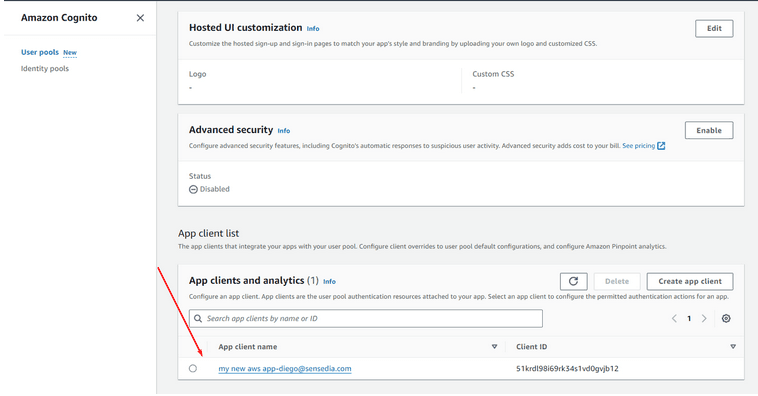
This method should create a new **App Client**:
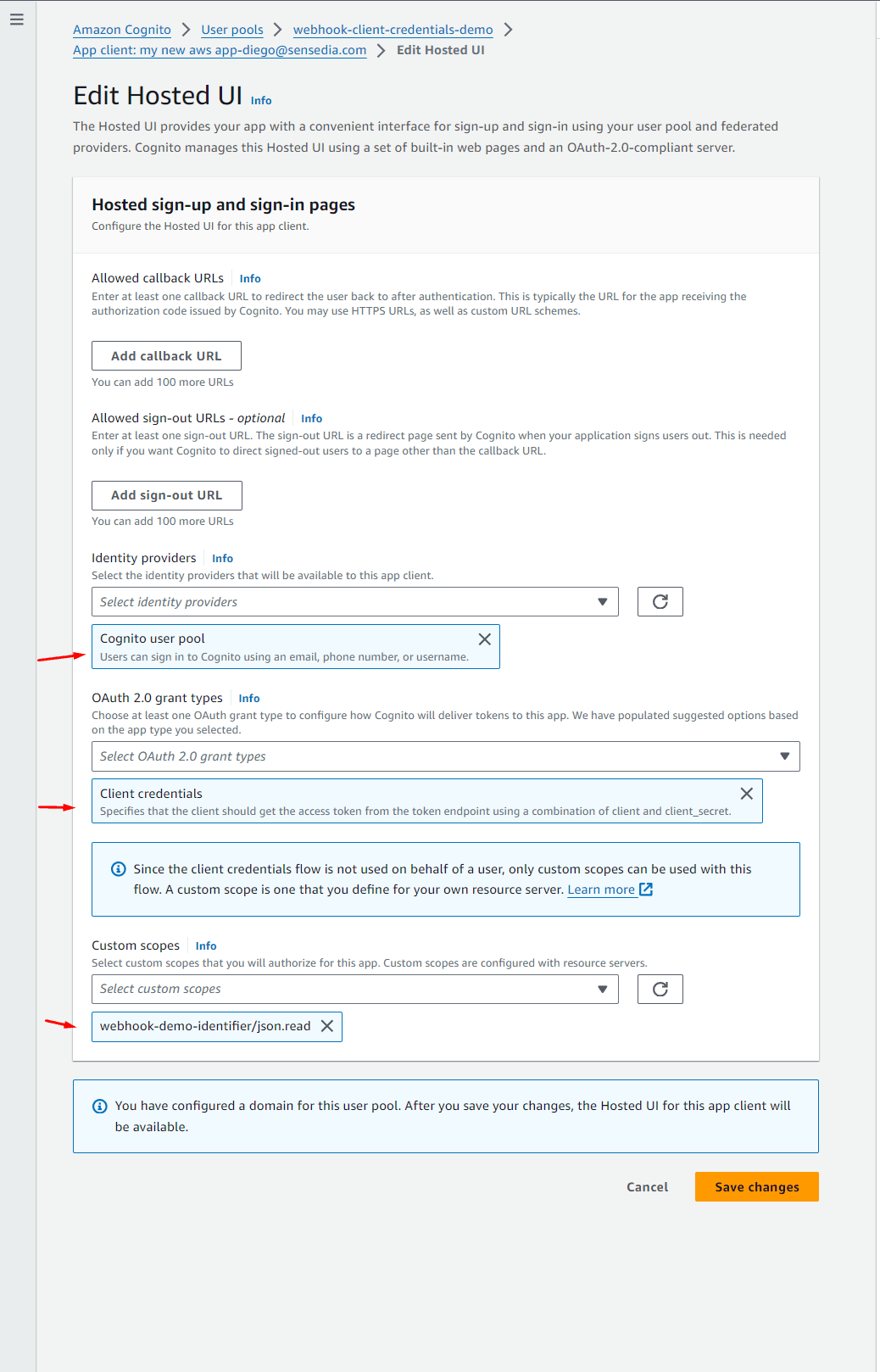
This app client will have the necessary configurations to generate Client Credentials:
To authenticate APIs using JWT tokens, you must have the authorizer set up in the AWS Gateway and linked to the Cognito user pool.
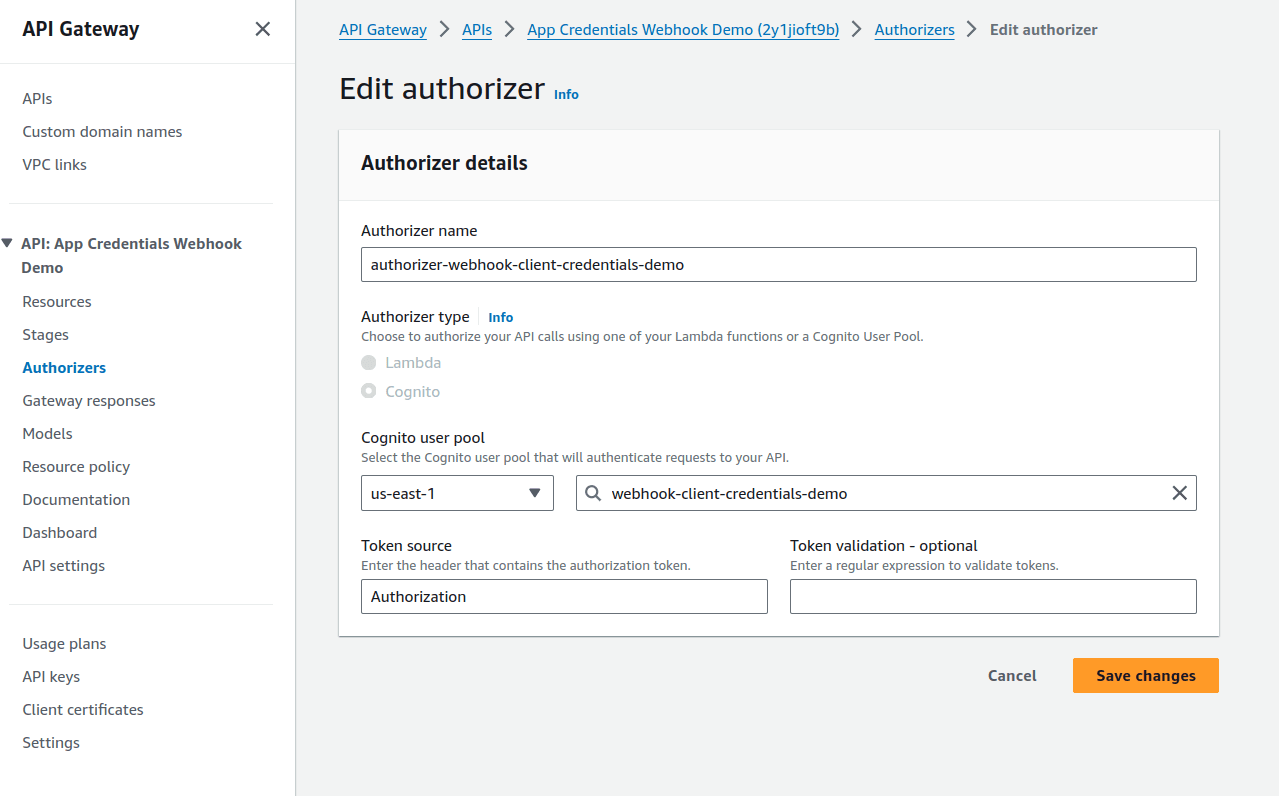
To enable developers to generate tokens, you will need to provide an endpoint giving the client ID and client secret generated during the app creation.
In the example below, a Cognito endpoint is used to generate the token according to the `grant-type`:
**Request**
```bash
curl --location 'https://.auth.us-east-1.amazoncognito.com/token' \
--header 'Content-Type: application/x-www-form-urlencoded' \
--header 'Authorization: Basic MmhjZnVuN3Y4amRvYXA4NHNlNjQ0bWZxdm06dXQxcnVrZWs4amU3YXZiNjU4dGZwdTFwY2hrcDFpYzE2azhkbWJzYnJvcGl2amk4cWln' \
--data-urlencode 'grant_type=client_credentials'
```
**Response**
```json
{
"access_token": "eyJraWQiOiJnSlV3UTFOT1ZVbmVHRWJaWGNQK1J2TGdzaGNOOTM1MHZwUVJwbWRnXC9hYz0iLCJhbGciOiJSUzI1NiJ9.eyJzdWIiOiIyaGNmdW43djhqZG9hcDg0c2U2NDRtZnF2bSIsInRva2VuX3VzZSI6ImFjY2VzcyIsInNjb3BlIjoid2ViaG9vay1kZW1vLWlkZW50aWZpZXJcL2pzb24ucmVhZCIsImF1dGhfdGltZSI6MTcwOTMyMDk0NCwiaXNzIjoiaHR0cHM6XC9cL2NvZ25pdG8taWRwLnVzLWVhc3QtMS5hbWF6b25hd3MuY29tXC91cy1lYXN0LTFfZVA2aVZ5UDhaIiwiZXhwIjoxNzA5MzI0NTQ0LCJpYXQiOjE3MDkzMjA5NDQsInZlcnNpb24iOjIsImp0aSI6IjFiZjcyMGQ0LTQ3NjUtNGU1Zi1hNDU1LTg4NDg0YTQ5MzFlNyIsImNsaWVudF9pZCI6IjJoY2Z1bjd2OGpkb2FwODRzZTY0NG1mcXZtIn0.MQlT8YXAkXEmtLiFV_K7pq6aEylwEo1FrAx1At3PeFHkZ82lbuxXcHvVU8CFUfhURAXBqhTRR-KTT1LpBj6i_JUUhr_2obwVgZfKn1n94pfRw0tny8S5g88vuhuqNXn4CypnwrtGzoyYgV9liXykMX-80Y6ILZgtBcaFaBwpEsShv9Q9Q1S-XwQcQSCG0NF4-LF-bFx_KW3ZA3kV5IVVP0XpupYiP7My346kQUqCYboEeaoTDbEz_HqPTI6-r9Wnud7FvrXzl6YT0fhU6SHhx5QeI-zARemrI561Xf5cKkljuYSOWkSBRTADV-pKMj--X6WiBRZmDPN2f-0ziwAQpw",
"expires_in": 3600,
"token_type": "Bearer"
}
```
### Revoking Credentials
- [**API Keys**](/docs/developer-portal/webhook#api-keys-revoke-example)
- [**Client Credentials**](/docs/developer-portal/webhook#client-credentials-revoke-example)
#### API Keys
See the example below:
```python
def delete_api_key(request_body):
"""Deletes an API key."""
client = boto3.client("apigateway")
try:
current_credential_type = request_body.get("credentialType")
validate_credential_type_is_supported(current_credential_type)
api_key_id = request_body.get("apiKeyId")
if api_key_id is not None:
client.delete_api_key(apiKey=api_key_id)
except client.exceptions.NotFoundException:
pass
except Exception as e:
logger.error("delete_api_key error: %s", str(e))
return handle_error(str(e))
return {"statusCode": 204}
```
This method will delete the API Key from the AWS console.
#### Client Credentials
See the example below:
```python
def delete_cognito_app_client(request_body):
"""Deletes a Cognito app client."""
cognito_client = boto3.client("cognito-idp")
try:
current_credential_type = request_body.get("credentialType")
validate_credential_type_is_supported(current_credential_type)
app_client_id = request_body.get("clientId")
cognito_client.delete_user_pool_client(
UserPoolId=USER_POOL_ID, ClientId=app_client_id
)
except cognito_client.exceptions.ResourceNotFoundException:
pass
except Exception as e:
logger.error("delete_user_pool_client error: %s", str(e))
return handle_error(str(e))
return {"statusCode": 204}
```
This method will delete the app client from the AWS console.
### Checking Availability
```python
def check_health():
"""Checks the health of the service."""
return {"statusCode": 204}
```