---
title: Quick Guide
description: General operation of the Events Hub. Main components.
documentId: get-started
locale: en-US
---

This quick guide helps you understand the operation of the **Sensedia Events Hub**. It provides an overview of how to:

- Configure routes to send and receive events.

- Apply security policies and automatic retry mechanisms for distributing events to subscribers.

<Callout type="TIP" title="TIP">
The links included on this page lead to more detailed sections of our documentation.
</Callout>

## Glossary

Throughout the documentation, you will encounter some terms specific to the messaging context. To facilitate understanding, we explain:

- **Publishers**: applications that send events. They are responsible for creating events and sending them to the **Events Hub**.

- **Subscribers**: applications or client partners that receive events and can take actions based on them.

- **Business moments**: opportunities for business growth that can generate revenue when leveraged using the **Events Hub**.

## General operation

The **Events Hub** allows you to manage an event distribution architecture through a low-code interface, requiring no advanced programming knowledge. You can register and manage publishers and subscribers independently.

![General Operation](https://creative-ball-51b3fc85c0.media.strapiapp.com/get_started_3a52caed87.gif)

To ensure the **Events Hub** knows which subscribers should receive specific events, publication and subscription routes are created, forming a channel for receiving and distributing events. These routes are defined using **topics**, **handlers**, and **contexts**, each with a specific path added to the publication URL. When publishers send requests to the **Events Hub**, we ensure they are distributed only to the subscribers registered to receive the event.

In addition to managing event publication and subscription, the **Events Hub** ensures delivery to subscribers through:

- Monitoring the delivery status.

- Automatic retry attempts.

- Manual resending via the interface in case of failure.

To ensure security throughout the event management process, you can add interceptors to the receiving flow. This allows you to control publisher access, which can be validated by an external server.

For subscribers, we include a digital signature with all distributed events to validate the origin of the requests. Additionally, you can configure a static or dynamic security token for secure information traffic.

## Topics, handlers, and contexts

Topics, handlers, and contexts form the channel for event publication and subscription. They organize the routes for receiving and distributing events, ensuring messages reach the correct subscribers.

### Topics

A **topic** is the last marker in the publication URL, through which the **Events Hub** identifies the subscribers for each event. Publishers send requests using the topic's publication URL, and the **Events Hub** forwards the events to all active subscribers in the topic.

### Handlers

**Handlers** are groups of topics that logically organize them. They also apply security and delivery policies shared across all topics within the handler.

### Contexts

**Contexts** allow topics to be reused in different scenarios. Authorization servers are defined per context, meaning two different contexts for a topic can use distinct authorization endpoints.

<Callout type="TIP" title="TIP">
The event publication URL consists of two parts: the base (unique to each client) and the placeholders **context, handler, and topic**, organized as follows: url-base/context/handler/topic.
</Callout>

>**Example: Same topic in different scenarios**
><br/>
>You have a handler named "Alerts" at the path `/alerts`, grouping API monitoring alert topics. One of these topics is `/latency`, which distributes latency alert events.
><br/>
>In this scenario, you can:
>
>1. Not register any context. In this case, the Events Hub sets the "Default" context, and no marker is added to the publication URL. Requests to the `latency` topic will be sent to `url-base/alerts/latency`, and all active subscribers will receive the events.
>
>2. Register a context to define environments. For example, in a testing scenario where you don't want subscribers to receive alerts, you can register the `testing` context and enable it for the `latency` topic.
><br/>
>To register subscribers in the context, link them to the `latency` topic and enable them only for the `testing` context. Events sent to `<url-base>/testing/alerts/latency` will be distributed only to subscribers in this context.

<Callout type="NOTE">
The testing context also allows using a mock authorization so your team doesn't need to validate the credentials of the default context's authorization endpoint.
</Callout>

## Configuring topics, handlers, and contexts

<Callout type="TIP" title="TIP">
To register handlers with contexts, we recommend registering the context beforehand on the [Contexts](/docs/events-hub/contexts) screen.
</Callout>

Handlers are created and managed on the [Handlers](/docs/events-hub/managing-handlers) screen. On the handler registration and editing screen, you can:

- Create and edit topics and policies.
- Assign contexts to topics by clicking the arrow icon ![Expand](https://creative-ball-51b3fc85c0.media.strapiapp.com/icon_expand_62b33f1187.png) on the registration screen. Contexts must be pre-registered on the [Contexts](/docs/events-hub/contexts) screen. Publisher authorization endpoints are defined per context on the [Authorizations](/docs/events-hub/authorizations) screen.

![Context, Handler, and Topic Registration](https://creative-ball-51b3fc85c0.media.strapiapp.com/handler_creation_0e8f7c8eea.gif)
<p align="center">
 <strong>Context, Handler, and Topic Registration</strong>
</p>

## Publishers and subscribers

The Events Hub allows intuitive and independent registration of both sides of event integration: producers and consumers.

**Publishers** are the source of events. They are registered on the [Publishers](/docs/events-hub/publishers) screen. You can create them or import an app from the **Sensedia API Platform**.

During registration, you connect the publisher to the topics it will send events to. Additionally, you choose which contexts will be shared with it.
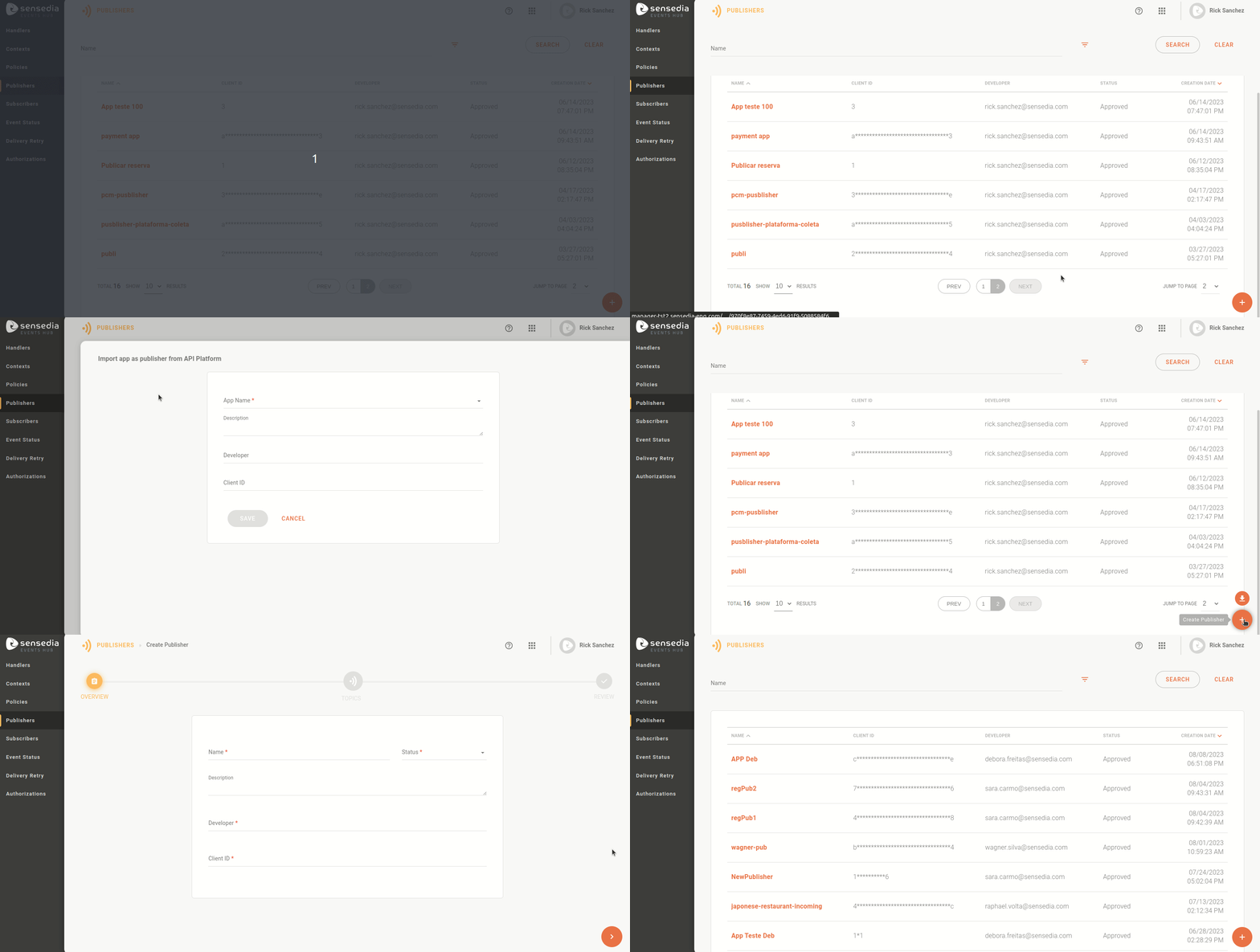
![Publisher Registration and Management Screen](https://creative-ball-51b3fc85c0.media.strapiapp.com/publisher_screen_646a618184.gif)
<p align="center">
 <strong>Publisher Registration and Management Screen</strong>
</p>

**Subscribers** are those who receive events. They are registered on the [Subscribers](/docs/events-hub/subscribers) screen. When registering a subscriber, you subscribe them to the topics they will receive events from and choose which contexts will be shared with them.

<Callout type="IMPORTANT" title="IMPORTANT">
Subscribers must configure a URL for each topic they will receive events from. This allows a single subscriber to receive events at different URLs.
</Callout>

![Subscriber Registration: Defining Subscriber URL](https://creative-ball-51b3fc85c0.media.strapiapp.com/subscribers_create_topics_subscribed_e7875ecccb.png)
<p align="center">
 <strong>Subscriber Registration: Defining Subscriber URL</strong>
</p>

## Security policies for publishers

On the [Policies](/docs/events-hub/policies) screen, you can define security measures for publishers and event delivery to subscribers. This includes:

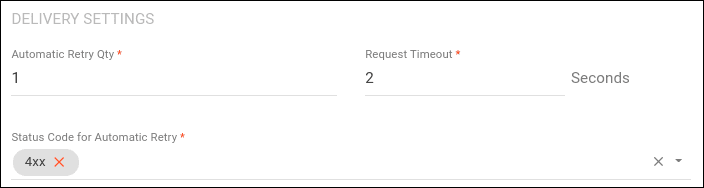
- The number of automatic delivery retry attempts.

- Request timeout.

- HTTP status codes that trigger retries.

Publisher security is ensured by interceptors that validate their identity, such as **OAuth**, **JWT**, **Client ID**, and **Access Token**. Additionally, you can filter publisher access by IP.
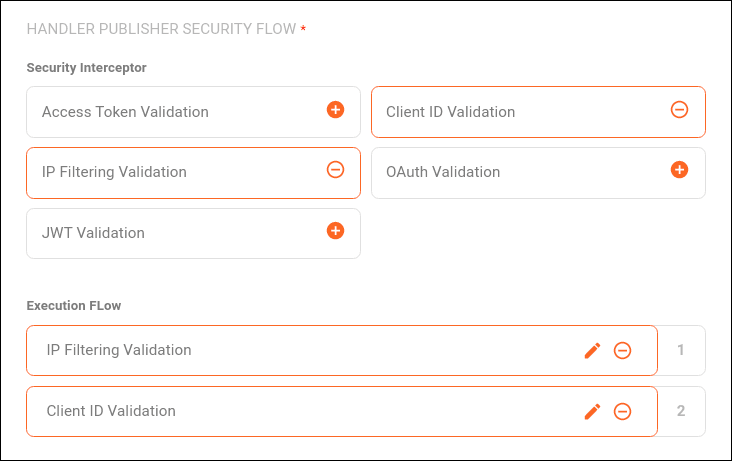
![Policy Configuration: Security Section](https://creative-ball-51b3fc85c0.media.strapiapp.com/policies_flow_0794eb94ed.png)
<p align="center">
 <strong>Policy Configuration: Security Section</strong>
</p>

![Policy Configuration: Retry Settings Section](https://creative-ball-51b3fc85c0.media.strapiapp.com/policies_retry_settings_62e3b5afff.png)
<p align="center">
 <strong>Policy Configuration: Retry Settings Section</strong>
</p>

Policies are applied to handlers during their creation or editing on the [Handlers](/docs/events-hub/handlers) screen. Therefore, all topics within a handler use the same policy.

Publisher authorization is defined at the context level by an external authorization server, configured on the [Authorizations](/docs/events-hub/authorizations) screen.

## Security in subscriber connections

The Events Hub implements security layers that allow subscribers to verify the origin of received messages. This is done through digital signatures included in all requests. The signature is a JWT token generated from a shared key between subscribers and the Events Hub during [subscriber registration](/docs/events-hub/subscribers#creating-subscribers).

To enhance security, you can also configure a static or dynamic token to be included in requests.
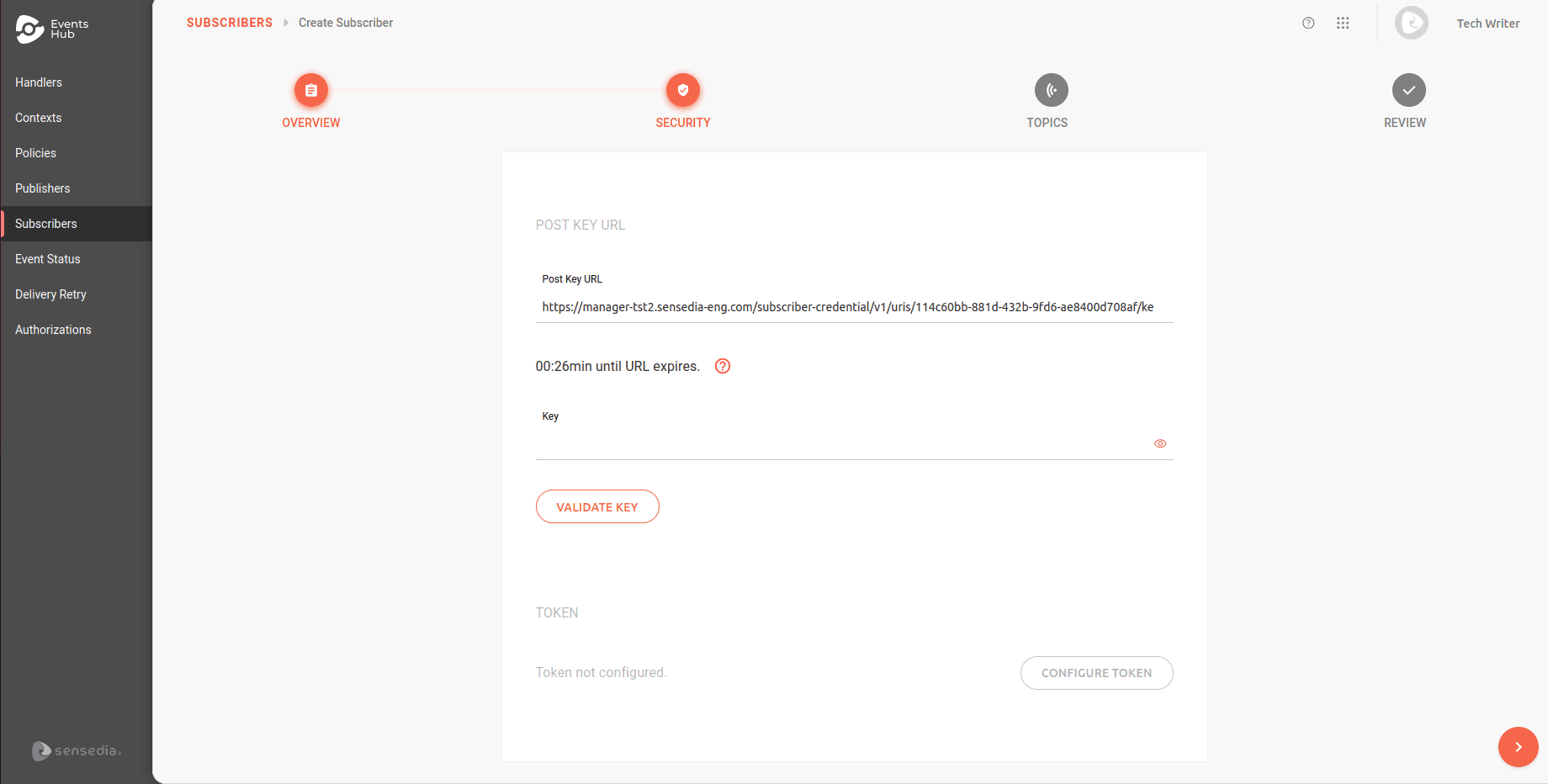
![Subscriber Registration: Mutual Key and Token Configuration Step](https://creative-ball-51b3fc85c0.media.strapiapp.com/subscribers_create_security_e5f1956b9b.png)
<p align="center">
 <strong>Subscriber Registration: Mutual Key and Token Configuration Step</strong>
</p>

## Event details and manual resending

You can track detailed information about received events on the [Event Status](/docs/events-hub/event-status) screen. For each event, the attempts and distribution history to subscribers are displayed.
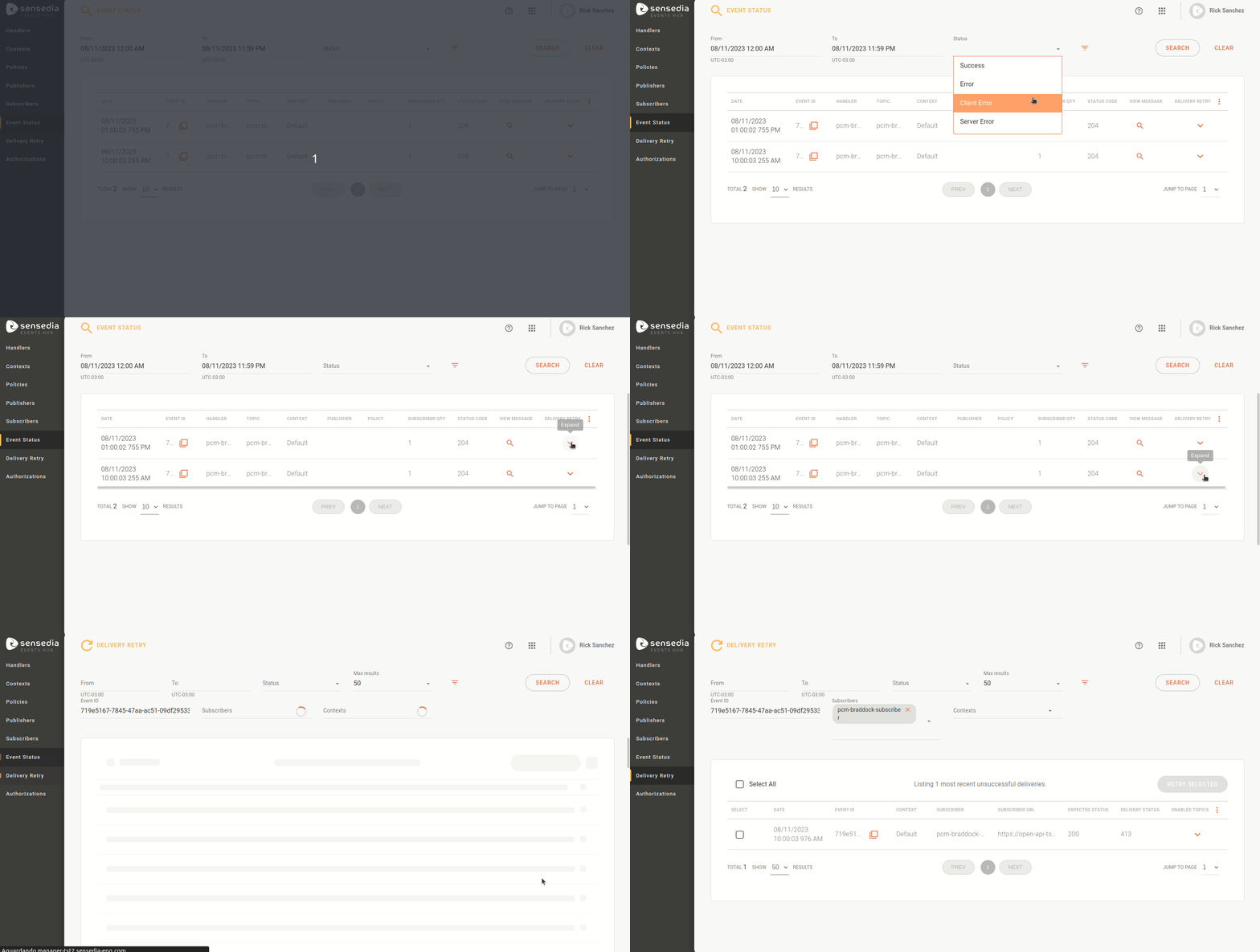
![List of Events Received from Publishers](https://creative-ball-51b3fc85c0.media.strapiapp.com/event_status_e1d86649bc.gif)
<p align="center">
 <strong>List of Events Received from Publishers</strong>
</p>

<Callout type="NOTE" title="NOTE">
Automatic delivery retries use an exponential backoff algorithm to increase success chances. However, if all delivery attempts to a subscriber fail, you can attempt a manual delivery on the [Delivery Retry](/docs/events-hub/delivery-retry) screen.
</Callout>