---
title: Subscribers - Security and Keys
description: Understand the security mechanisms of Events Hub.
documentId: subscribers-security-keys
locale: en-US
---
## Subscriber signature
All requests made to event subscribers are signed by a mechanism that allows subscribers to verify the origin of the message.
The signature is a token generated by Sensedia Events Hub using a mutually known key (between the Events Hub and the subscriber) that is provided during subscriber registration (see details [below](#signature-key)).
The generated signature will be a JWT (JSON Web Token) with the HS256 algorithm (HMAC with SHA-256), created with the following values:
```json
{
"typ": "JWT",
"alg": "HS256"
}
```
```json
{
"iss": "staging",
"sub": "7f08e914-3e64-4acb-9a1e-d21f9cbabcba",
"jti": "266dd6d0-4f21-4191-aa05-2d9833fd8eee",
"c_hash": "0d320d3ab6b8165bc347c1ffabbe1bfd6dbe1b436df23131a8f855f35834c2cc",
"iat": 1603894744
}
```
**Fields:**
- `iss`: the `customerName`.
- `sub`: the `subscriberId`.
- `jti`: the `transactionId`.
- `c_hash`: the SHA-256 hash of the body content.
- `iat`: the UTC timestamp of the request.
## Signature key
A mutually known key must be provided when creating a subscriber in the Events Hub (see details on creating subscribers [here](/docs/events-hub/subscribers)).
Subscription to events is only possible after entering the key in the **Key** field and clicking **VALIDATE KEY**.
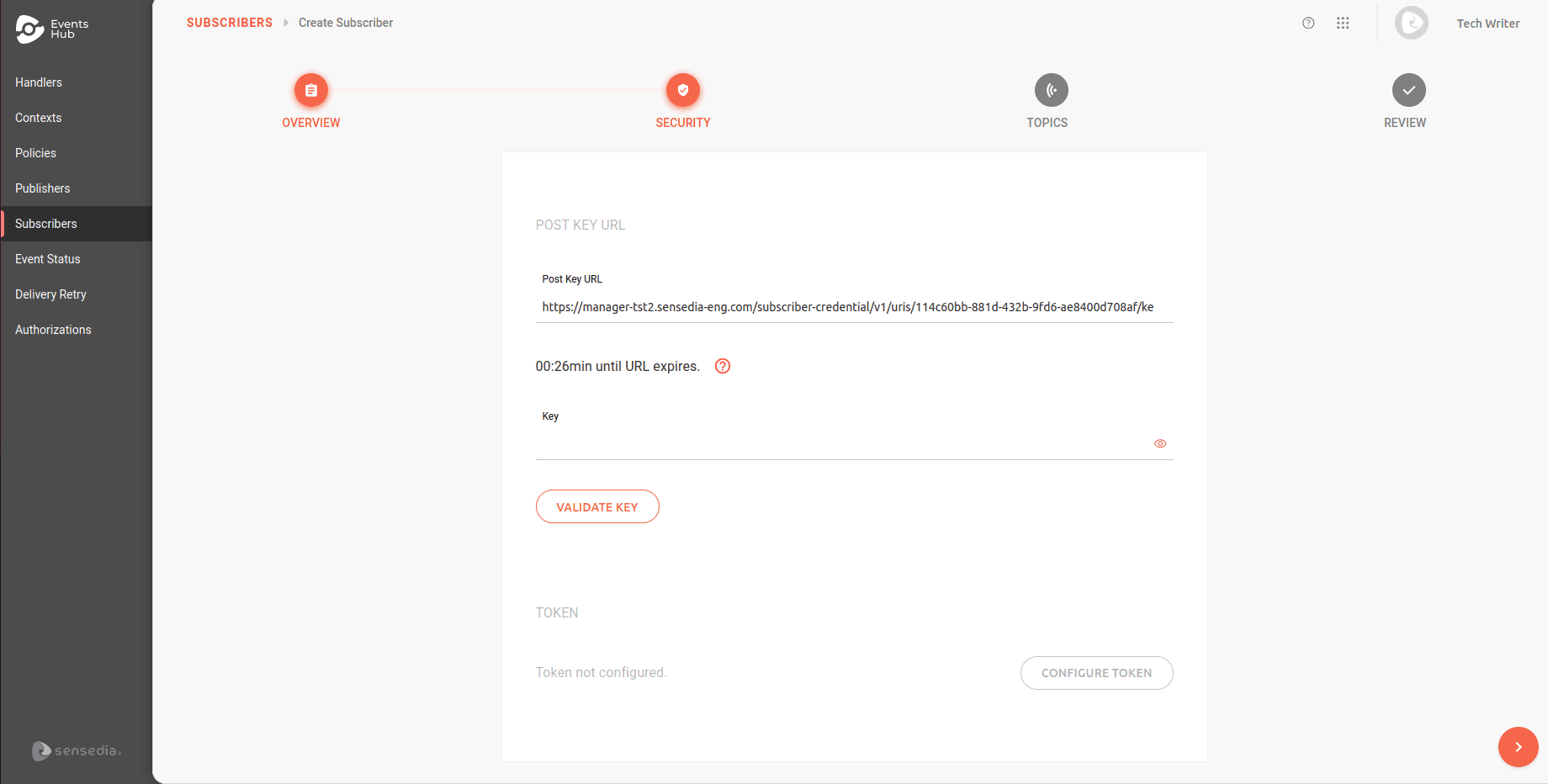
Previously, key validation required the use of external tools such as *Postman*, making a POST request with the URL provided in the **Post Key URL** field.
Currently, validation is performed directly in Events Hub, without the need to leave the subscriber registration interface.
To validate, enter a key of your choice (between 32 and 255 characters) in the **Key** field and click **VALIDATE KEY**.
During the validation process, a time limit is displayed to complete the operation. If the time expires before validation, click the  icon to restart the countdown.
Once validated, the key is stored securely and cannot be retrieved later.
## JWT token
The subscriber will always receive the signature in a request header identified as `x-CLIENTE-webhooks-signature`, with the content always transmitted in Base64 (regardless of whether it is used for verification or other security mechanisms described below).
In other words, the Events Hub will always transmit the signature in requests to subscribers, as shown in this example header:
```json
{
"Content-Type": "application/json",
"x-sensedia-webhooks-signature": "Y2E4MWNiMTYtNDNlNC0zZTk2LWFhZWEtNDg2MWU3NzkxZGM3"
}
```
The user can validate the JWT signature in their code.
In the example below, we use Java:
```java
// Validate JWT Signature
io.jsonwebtoken
jjwt
0.9.1
public static Claims decodeJWT(String jwt, byte[] subscriberKey) {
// This line will throw an exception if it is not a signed JWS (as expected)
Claims claims = Jwts.parser().setSigningKey(subscriberKey).parseClaimsJws(jwt).getBody();
return claims;
}
```
## Security token options
In addition to the signature, which is always transmitted, the Events Hub also provides the option to send a token for the security requirements of event receivers.
After the subscriber has registered their mutual key for signature generation, they can choose to receive requests with an additional token.
There are two token options: **static** and **dynamic** (the former does not expire, while the latter does).
Both must be hash tokens in SHA-256 format and Base64 encoded.
In both cases, the subscriber will also have the signature key for validation and request assurance.
If the token is configured to be transmitted in the header, both the signature and the token will be present (the token under the user-configured name, as in the example below where it is `security-token`):
```json
{
"x-sensedia-webhooks-signature": "ZXlKMGVYQWlPaUpLVjFRaUxDSmhiR2NpT2lKSVV6STFOaUo5LmV5SnBjM01pT2lKemRHRm5hVzVuSWl3aWMzVmlJam9pTW1JMFlUVTJZV0V0WkdVeU55MDBPVEl6TFdFeVltTXRNbVkyTVRBMU0yVmpNamcwSWl3aWFuUnBJam9pWXprNU56UmxNekV0TURRNU1TMDBPREJoTFRrelpUWXRabVJqWlRFek1EaGlNR0V3SWl3aVkxOW9ZWE5vSWpvaVl6bGtNMkZqT0RJMU1UYzFNR1psTWpNd01EQTVPR1ptTVRWaFlUYzJOVEprTVRWbE5UQmpOemxoWXpSaVlqaGhOMlEwWWpobE1URXdOekpqTlRoaVl5SXNJbWxoZENJNk1UWXhPRFF3TlRnMU9YMC56UTVYTnpEaE5ZdU5DTVd1a0ktckZxeTkzbFFoYnRXalc2ZDNpT3dlUV9B",
"security-token": "YWJjZGVmZmYtYXNkYXNkLWFzZC12c2JkZmRnZGYtNG1hc2Rkd2V1Z3VkYQ"
}
```
You can configure only one token per subscriber.
### Static token
When choosing to receive requests with a static token (which does not expire), it can be registered directly in the Events Hub.
You must provide the token value that will be transmitted in all requests.
This is the simplest approach, requiring fewer resources and less coding on the subscriber's side (compared to the dynamic token). However, it is more susceptible to attacks (such as replay attacks).
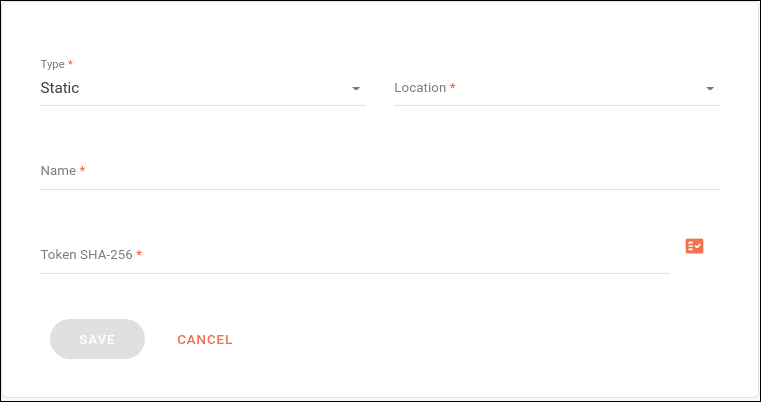
The token must be configured in the **SECURITY** step during subscriber registration or editing, using the following fields:
- **Type**: type of token (choose Static).
- **Location**: where the token should be passed in the request (options: header or query param).
- **Name**: name under which the token value will be passed.
- **Token SHA-256**: token value.
If desired, a random token can be generated using the  icon.
### Dynamic token
The dynamic token offers greater security for message traffic between the Events Hub and subscribers compared to the static token.
The dynamic token has an expiration period and is fully managed by the subscriber.
When dynamic tokens are used, the subscriber must allocate more resources and take on significant responsibility for the ecosystem's uptime.
This is because the Events Hub will depend entirely on the subscriber to obtain the tokens, which may result in missed messages.
However, the dynamic nature of the mechanism makes attacks more difficult, making it a more secure option.
When choosing this approach, the subscriber must provide an interface for the Events Hub to obtain the token.
This interface must provide an HTTP POST responsible for generating the tokens.
In this approach, the subscriber must always validate the signature transmitted in the token request by the Events Hub.
**Token request:**
```json
{
"content-type": "application/json",
"x-CLIENTE-webhooks-signature": "xxxxxxx"
}
```
```json
{
"type": "token"
}
```
**Token response:**
```json
{
"content-type": "application/json"
}
```
```json
{
"access_token": "",
"expires_in": ""
}
```
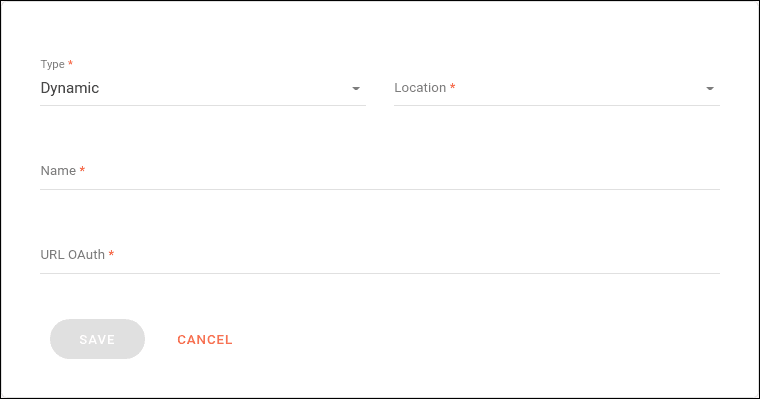
The token must be configured in the **SECURITY** step during subscriber registration or editing, using the following fields:
- **Type**: type of token (choose Dynamic).
- **Location**: where the token should be passed in the request (options: header or query param).
- **Name**: name under which the token value will be passed.
- **URL OAuth**: URL for generating the token value.
There is no refresh for registered dynamic tokens.
Tokens are reused during the time defined by the user.