---
title: Webhook Credentials
description: Lists webhook credentials registered in Flexible Actions
documentId: webhook-credentials
locale: en-US
---
The **WEBHOOK CREDENTIALS** tab (**Integrations > WEBHOOK CREDENTIALS**) lists authentication credentials used by **Flexible Actions** to send requests to registered endpoints.
These requests are one of the options for sending notifications when an alert is triggered and are configured in the **ACTIONS** step when creating an alert (both in [Platform Events](/docs/flexible-actions/creating-platform-events) and in [Runtime Alerts](/docs/flexible-actions/creating-runtime-alerts)), within the **Webhook** option.
Credentials can consist of a **client ID** or **client ID + secret**. Their configuration also includes the location where the information will be sent in the request (which can be in the header or query param).
## Credentials list
The tab lists all webhook credentials existing in **Flexible Actions**, sorted by last modified date:
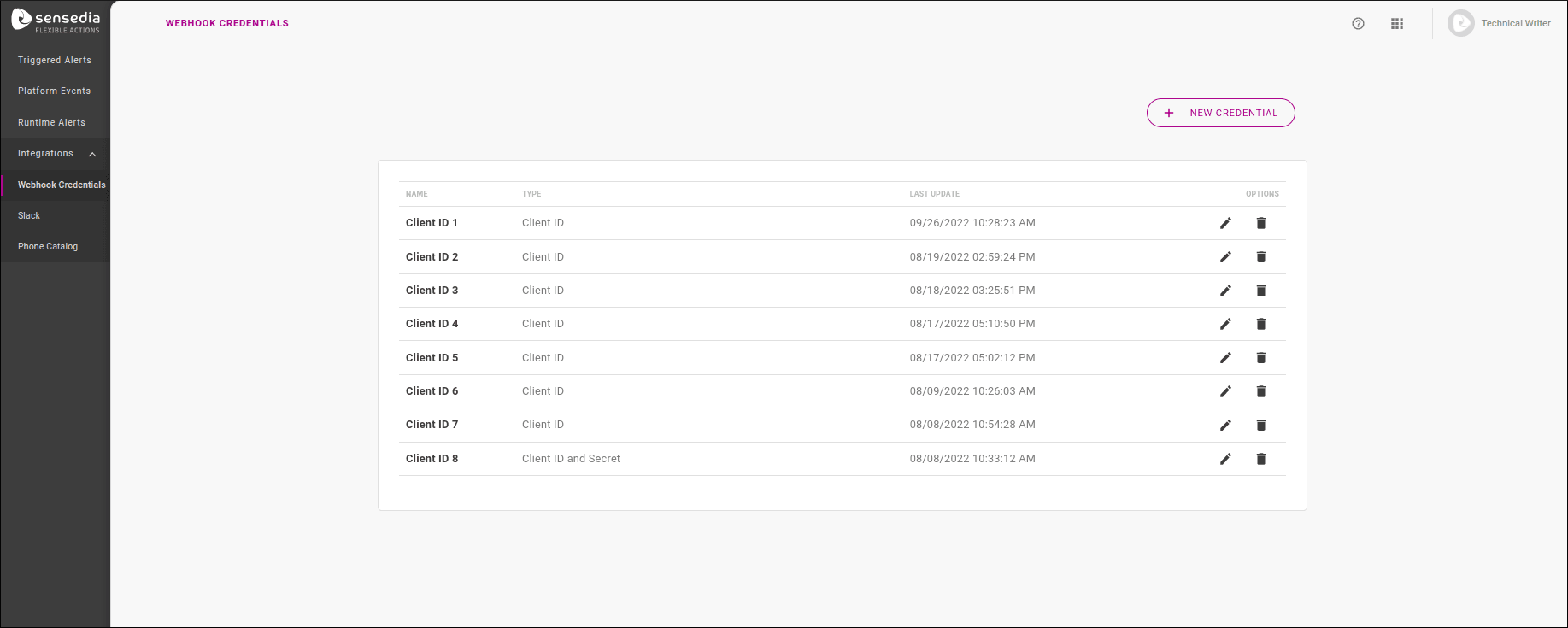
The listing table displays the credential's identifier name, its type (whether `Client ID` or `Client ID and Secret`), and the last modified date in its settings.
In addition, the **OPTIONS** column has two action icons:
-  to edit a credential.
-  to delete it.
It is possible to delete a credential even if it is being used in the webhook settings of an alert.
In this case, when viewing the alert overview screen, the webhook will be shown as unauthenticated ("No Auth").
## Creating credentials
To create a new credential, click the **+ NEW CREDENTIAL** button in the upper right corner of the screen.
Enter a name for the credential and choose its type: `Client ID` or `Client ID and Secret`. This will open the other configuration fields, which depend on the type.
The credential name does not need to be unique, but if you have multiple credentials with the same name, it will be difficult to select the one you want when configuring a webhook in an alert.
### Client ID
If your credential is of type Client ID, fill in:
- **Field Name**: name of the field that will be in the request (composing the name/value pair);
- **Location**: where the information will be in the request, which can be `Header` or `Query Param`;
- **Value**: value of the client ID, composing the name/value pair.
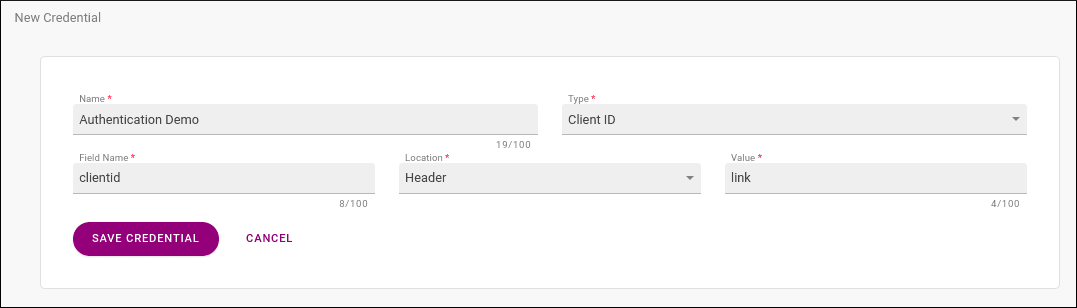
When only the client ID is used, it is displayed unencoded in the request. Using the example in the image above, where the client ID was registered to be sent in the header, the header will contain: `clientid: link`.
If the same client ID were included as a query param, we would have a POST request `/?clientid=link`.
After saving your credential, it can be used in the configuration of a webhook in [Platform Events](/docs/flexible-actions/creating-platform-events) and [Runtime Alerts](/docs/flexible-actions/creating-runtime-alerts).
### Client ID and Secret
If your credential is of type Client ID and Secret, fill in:
- **Field Name**: name of the field that will be in the request (composing the name/value pair);
- **Location**: where the information will be in the request, which can be `Header` or `Query Param`;
- **Client ID**: value of the client ID, composing the name/value pair;
- **Secret**: value that will be added to the client ID.
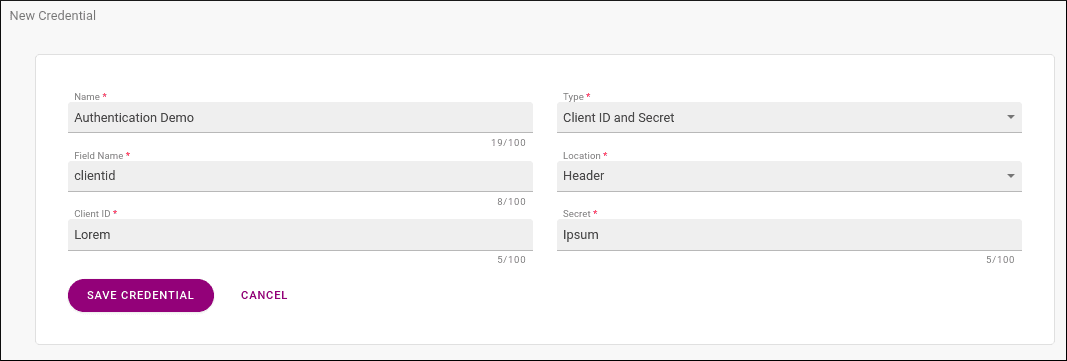
When the client ID is used together with the secret, the value sent in the request is composed of both client ID and secret, encoded in Base64. Using the example in the image above, where the value of client ID + secret was registered to be sent in the header, the header will contain: `clientid: bGlua2Vwb25h`.
If the same client ID were included as a query param, we would have a POST request `/?clientid=bGlua2Vwb25h`.
After saving your credential, it can be used in the configuration of a webhook in [Platform Events](/docs/flexible-actions/creating-platform-events) and [Runtime Alerts](/docs/flexible-actions/creating-runtime-alerts).
## Editing credentials
To edit a credential, click  in the **OPTIONS** column of the existing credentials list, which will take you to a registration screen identical to the credential creation screen.
You can edit any fields of a credential, **except** the type (Client ID or Client ID and Secret). In this case, you need to delete the credential and create a new one.