---
title: Year 2025
description: Sensedia Integrations release notes - 2025
documentId: ipaas-release-notes-2025
locale: en-US
---
## December 2025
**Fix**
- We fixed an error that caused deployment failure of an integration due to the absence of a flow variable that had been previously deleted and was no longer in use.
**Fix**
- We fixed an issue where, when accessing logs through the **Executions** screen, it was not possible to view logs from asynchronous processes. However, when accessed through the **Trace Detail** screen, they were displayed normally.
**New Features**
- **New component released**
You can now use the **Set Headers** EIP in your integrations, which allows you to set multiple headers in a single step. This brings more speed and agility to configuration, while keeping the flow organized, reducing duplications, and standardizing the information used by subsequent components.
For more information, see the [Set Headers](/docs/integrations/ipaas-eips-setheaders) EIP page.
- **Advanced data source properties configuration**
The advanced properties configuration provides more detailed control of the JDBC connection pool, in addition to enabling specific adjustments to connection behavior. This helps improve performance, increase resilience to network failures, and optimize costs.
For more information, see the [Data Sources](/docs/integrations/ipaas-data-sources-create) page.
**New Feature**
- **Advanced parameters configuration in legacy database connectors (legacy documentation - canvas)**
Now, when configuring a database connector, you can define advanced connection pool parameters, optimizing performance, resource consumption, and stability of connections used in integration flows. These parameters are configured in each connector's form, accessible through the **Connector Manager** screen, and can be applied to both **Staging** and **Production** environments. The configuration is available for the following connectors:
- Azure SQL
- DB2
- Firebird
- MySQL
- Oracle 11g
- Oracle 12c
- Oracle 19c
- PostgreSQL
- Progress
- SQL Server 2022
- SQL Server 7.2
- Tasy
- ctreeACE
**Fix**
- We fixed an issue that caused deployment errors in integrations using the "zipFile" dataformat to perform marshal, preventing correct dependency injection.
**Improvement**
- Integrations now displays the service name (flow name/version and environment) in logs not associated with executions. Previously, logs unassociated with executions were sent to Analytics with only "-" in the **service name** field. With this improvement, all logs now include complete identification, facilitating tracking and analysis.
**Fixes**
- We fixed an error that caused column misalignment (_Cell Shifting_) in the Excel file (.xlsx) reading component. The failure occurred when the parser did not respect empty cells at the beginning of rows, shifting all subsequent data to the left.
**New Features**
- **Data source deletion**
You can now delete data sources directly from the **Data Sources** screen by clicking the trash icon, or from the edit screen of the data source you want to remove.
- **Selecting data source name from dropdown list**
It's now easier to link data sources to integration flows. In JDBC, SQL, and SQL Stored Procedure components, instead of manually typing the exact data source name in the **Data Source** and **Data Source Name** fields, you can simply select the desired data source from the dropdown list.
## November 2025
**Fix**
- We fixed an error where a flow took excessively long to load the Diagram. Even after loading, the screen remained frozen, preventing any action.
**Improvement**
- **Optimization of Excel file processing in marshal and unmarshal EIPs**
We optimized the processing of spreadsheets in XLSX format by replacing Apache POI with FastExcel. Additionally, the in-memory JSON string construction was replaced by JSONGenerator (in streaming mode) for both XLS and XLSX formats.
**New Feature**
- **New component released**
You can now use the SMB component in your integrations, which allows you to connect your flow to shared directories via the SMB/CIFS protocol and send files directly to a remote server.
Check out all available [connectors](/docs/integrations/ipaas-connectors) and [triggers](/docs/integrations/ipaas-triggers).
**Fixes**
- We fixed an error where the logs screen displayed service names from other flows, instead of showing only the service names of the flow from the queried deployment.
- We fixed an error that prevented credential validation when creating an authorization, returning a `422` error.
**Improvement**
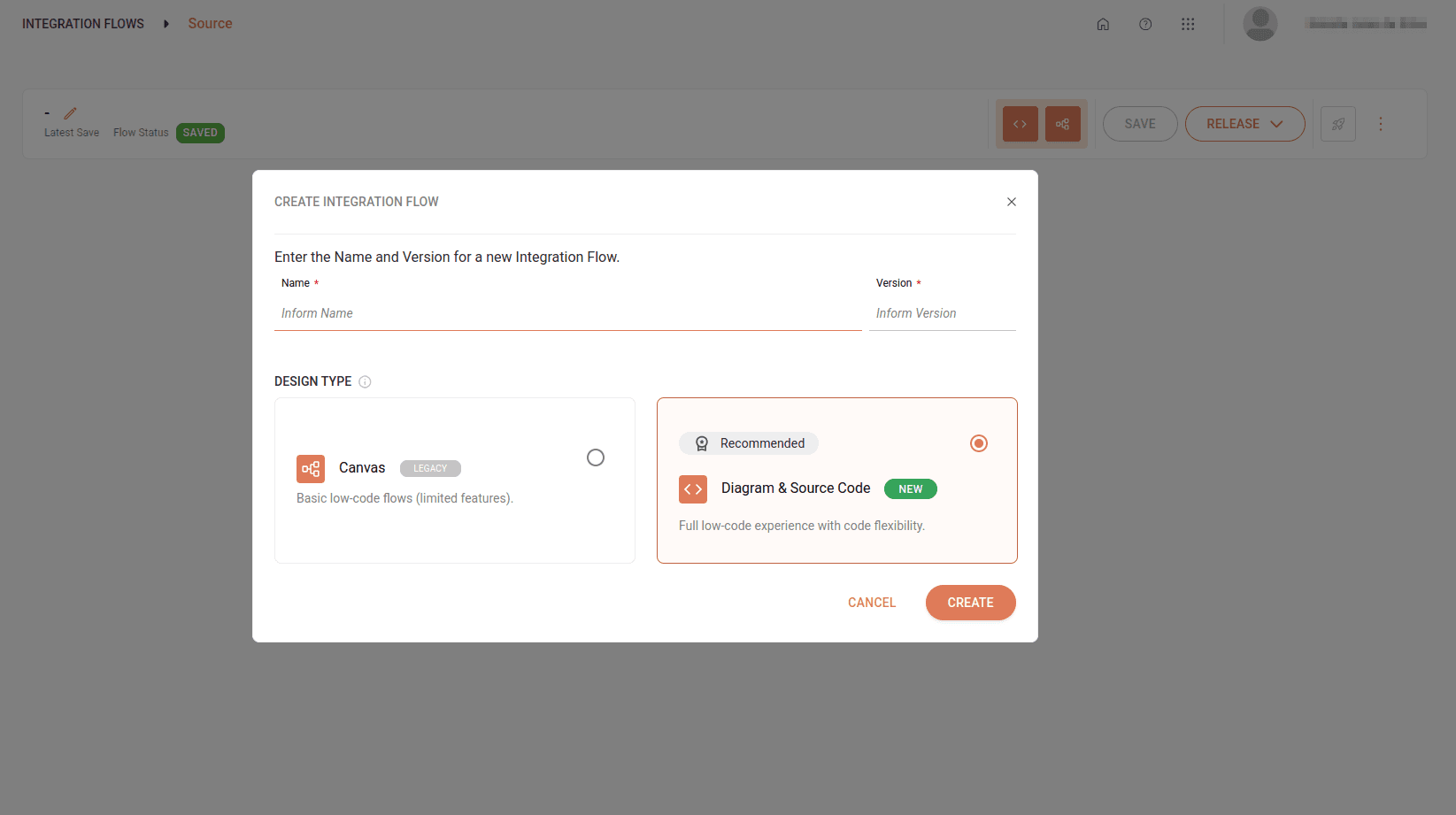
- **Layout and label adjustments on the "Create Integration Flow" screen**
The "Create Integration Flow" screen has been updated with a new layout and new labels. Now, the **Diagram & Source Code** option is highlighted as the recommended alternative for creating integrations, alongside the Canvas (legacy) option.
Enjoy the low-code experience combined with code flexibility to create integrations more efficiently.
See here how to [create your integrations](/docs/integrations/ipaas-flow-create).
**New Feature**
- **Database connection via JDBC**
It is now possible to connect your integration flows to databases through the new **Data Sources** functionality.
With it, you can configure JDBC connections simply and securely, reuse them in different flows, and manage credentials on a specific screen.
Supported databases:
- SQL Server / Azure SQL
- PostgreSQL
- Oracle Database
- MySQL
- DB2
- Firebird
This improvement makes your integrations more efficient, secure, and easy to manage.
Check out more details on the [Data Sources](/docs/integrations/ipaas-data-sources) page.
## September 2025
**New Feature**
- **Release viewing and restoration**
You can now view and restore releases. With this functionality, if a recent release introduces problems or if it's necessary to return to a previous business logic, you can revert the integration flow to a known stable version, ensuring more security and control in your deployments.
**New Feature**
- **Formula support in Custom (Excel) data format type in marshal and unmarshal EIPs**
The Custom (Excel) data format type now correctly reads cells containing formulas (e.g., =A1+B1) and displays them in the JSON file.
**New Feature**
- **Excel file support in marshal and unmarshal EIPs**
The **marshal** and **unmarshal** EIPs now support **Excel** files through the **Custom** data format type.
With this feature, it's possible to process files in `.xls` and `.xlsx` formats in your integration flows.
**New Features**
- **Release deletion**: you can now delete releases by clicking the trash icon in **Release History**.
- **Release viewing in Deployments, Executions, and Attributes listings in Traces**: releases are now displayed in the listings in Deployments, Executions, and Attributes in Traces.
**Fix**
- We fixed an error that occurred during deployment when switching from a REST trigger to a non-REST trigger (e.g., Quartz).
**Improvement**
- If the user inserts spaces in the name of a query parameter in REST connectors, the system will display a message informing that space is an invalid character (Diagram-type flows).
## August 2025
**New Feature**
- **Release creation and management**
Now, the integration deployment process requires creating a release, which represents a specific version of your integration flow.
With this functionality, it's possible to control and manage different versions of your integrations, ensuring more organization and traceability in deployments.
Check out more information on [how to create releases](/docs/integrations/ipaas-flow-release).
**Fix**
- We fixed an error that occurred when using the PollEnrich EIP. When trying to create an endpoint from the URI, Camel couldn't find the responsible component and the error was reported after deployment, when starting flow execution.
**Fix**
- We fixed an error that occurred during deployment of flows using the unmarshal EIP and the PGP dataformat.
**New Feature**
- **New component released**
You can now use Google Cloud Storage in your integrations, facilitating the storage and retrieval of objects in Google Cloud buckets.
**Fix**
- We fixed an error that occurred when using REST connectors in Diagram-type flows, where request responses were sent to Analytics without the attributes that associate the log message to the specific `runtimeExecutionId`, making it difficult to view errors in executions.
## July 2025
**New Features**
- **AI Chat specialized in YAML DSL for creating integration flows (Source-type flows)**
You now have the support of a chat with AI specialized in integrations in YAML DSL format to create and edit **Source** type integration flows.
Just write a prompt in the dialog box to receive a YAML DSL script as a response and paste it into the `main.yaml` editor.
Check out more information in [Sensedia AI Copilot](/docs/integrations/ipaas-ai).
- **Cut and paste steps functionality (Source-type flows)**
Facilitate editing your integrations with the cut and paste steps functionality within the same flow.
Just click the three-dot icon in the upper right corner of the step and select the desired option.
## June 2025
**New Features**
- **Access to Sensedia Platform from Sensedia Integrations**
It's now possible to access the Sensedia Platform home from Sensedia Integrations!
Check out all contracted products and learn about other products and news! Just click the corresponding icon in the upper right corner of the screen.
- **Adding EIPs and components to the canvas via drag and drop (Source-type flows)**
Add EIPs and components to the canvas simply by dragging them from the available elements menu.
This functionality makes flow building faster and more intuitive.
- **Copy and paste steps functionalities (Source-type flows)**
Facilitate editing your integrations with the copy and paste steps functionalities within the same flow.
Just click the three-dot icon in the upper right corner of the step and select the desired option.
- **Components and EIPs: configuring List and Map type fields from Diagram (Source-type flows)**
Configure List and Map type fields directly from component and EIP forms in the Diagram tab. The low-code experience is becoming more complete!
**New Feature**
- **Creating resources and flow variables from Diagram (Source-type flows)**
You can now create and edit [resources](/docs/integrations/ipaas-resources) and [flow variables](/docs/integrations/ipaas-flow-variables) directly in the **Diagram** tab by clicking the corresponding icons.
This makes the configuration process more visual and intuitive, allowing you to easily manage your integration flow's resources and variables without having to switch between tabs.
## May 2025
**Fix**
- We fixed an error that prevented configuring conditions when adding a second Choice in the flow, right after another existing Choice. This problem didn't allow proper use of When, compromising the expected logic.
**Fix**
- We fixed an error that occurred after creating and saving a connector in Diagram-type flows: the connector stopped displaying correctly, the configuration form appeared blank, and the **Security** field was blocked.
**Improvement**
- **Migration from Apache Camel version 4.0 to version 4.8**
We migrated Apache Camel from version 4.0 to 4.8. The new version brings improvements in stability, performance, and support for new features for more efficient integration flows.
**New Feature**
- **Multicast EIP configuration from Diagram tab (Source-type flows)**
You can now add the **Multicast** EIP from the Diagram tab.
This EIP distributes a message to multiple processing routes, allowing each route to execute its logic independently.
Thus, the integration flow connects to multiple systems or services simultaneously.
Check out more information about the [Multicast](/docs/integrations/ipaas-eips-multicast) EIP.
**Improvement**
- **Access to integration logs on Deployments screen**
You can now access integration logs from the Deployments screen.
Check out more details about the [Deployments](/docs/integrations/ipaas-deployments) screen.
**Improvement**
- **Error message display**
Now, when deploying an integration that has authorization, an error message will be displayed if the authorization is not configured for the selected environment.
**Fix**
- We fixed an error that prevented **Test Mode** execution in integrations using API Key type authorization, even when the authorization was correctly configured for the Staging environment.
## April 2025
**New Feature**
- **Do Try EIP configuration from Diagram tab (Source-type flows)**
You can now add the **Do Try** EIP from the Diagram tab.
This pattern allows creating integration flows with a Try block, which captures possible exceptions during execution.
This way, failures are handled appropriately without interrupting the integration.
Check out more information about [Do Try](/docs/integrations/ipaas-eips-dotry).
**Improvement**
- **Improvement in error log content**
Product error logs now display more detailed information, including the error cause returned in the **Stacktrace** field in Analytics.
This improvement facilitates problem analysis during execution and integration deployment.
**Fix**
- We fixed an error that occurred in flows making HTTP calls using the "toD" component, where the trace didn't correctly display the HTTP verb (POST, GET, etc.) nor the complete URL.
**New Feature**
- **Direct component configuration from Diagram tab (Source-type flows)**
You can now add the Direct component and link Direct routes to the main route from the Diagram tab.
## March 2025
**Fix**
- We fixed an error that prevented correct rendering of flows with "Direct" type routes reused more than once within the integration.
**New Features**
- **Choice and Throw Exception EIPs configuration from Diagram tab (Source-type flows)**
You can now add and configure the Choice and Throw Exception EIPs directly in the Diagram tab.
Check out more information about [Choice EIP](/docs/integrations/ipaas-eips-choice) and [Throw Exception EIP](/docs/integrations/ipaas-eips-throw-exception).
**Fix**
- We fixed an error that prevented finishing flow execution in test mode.
When starting a flow in **Test Mode**, it remained running indefinitely and wasn't displayed in the **Executions** tab, making monitoring and problem analysis difficult.
**New Feature**
- **Expression Languages configuration from Diagram tab (Source-type flows)**
You can now edit **Expression Languages** of EIPs from the Diagram tab.
When opening the form of an EIP that uses an Expression Language, specific configuration fields are displayed, allowing you to correctly configure the expression languages necessary for the EIP to function.
Settings applied in the form are reflected directly in the Source Code tab, ensuring greater consistency between tabs.
Read more about [Expression Languages](/docs/integrations/ipaas-expression-language).
**Fix**
- We fixed an error where a Source-type flow with the **Stop EIP** didn't display execution logs in the **Executions** tab.
## February 2025
**New Features**
- **New Camel components released**
- **Azure Key Vault**: used to manage and protect secrets, encryption keys, and certificates securely.
- **Fast Healthcare Interoperability Resources (FHIR)**: enables standardized health data exchange between systems, ensuring interoperability and communication consistency.
It defines a flexible structure based on resources, representing clinical, administrative, and financial entities, enabling standardized communication between different platforms.
- **Google BigQuery** and **Google BigQuery SQL Standard**: allow connecting systems to BigQuery, enabling data ingestion, query execution, and result export to other systems.
**Fixes**
- We fixed an error that occurred when creating a flow in the Source Code tab with the "RemoveHeaders" EIP.
When switching to the Diagram tab and returning to the Source Code tab, the script was incorrectly modified.
- We fixed an error that prevented deploying an existing integration, even when there were no changes to it.
**Fix**
- We fixed an error where script validation in the Source Code tab identified false errors in use cases of the "to", "toD", and "wireTap" EIPs.
**New Feature**
- **Data Formats configuration from Diagram tab (Source-type flows)**
You can now edit **Data Formats** of EIPs from the Diagram tab. When opening the form of an EIP that uses a Data Format, specific configuration fields are displayed, allowing you to correctly configure the data formats necessary for the EIP to function.
Settings applied in the form are reflected directly in the Source Code tab, ensuring greater consistency between tabs.
**New Feature**
- **Creating Source-type integrations in a low-code way**
Integration creation is even more visual and intuitive!
With the improved low-code experience, you can create and edit your **Source** type integration flow directly in the **Diagram** tab, without needing to write code.
This makes the process simpler and more accessible, ensuring more agility in building integrations.
Check out more information on how to [create Source-type integrations](/docs/integrations/ipaas-flow-create).
In the Diagram tab, it's only possible to create and edit flows that use components and EIPs with simple parameters.
Additionally, it's not possible to add components or EIPs that have branches.
For advanced customization, you can switch to the **Source Code** tab, where you can directly edit the code corresponding to your flow.
Changes made in one tab automatically reflect in the other.
**New Feature**
- **Viewing audit logs in Access Control**
You can now check the audit logs of your integration flows directly in Access Control.
To do this, simply use the **Product** filter and select **Sensedia Integrations**.
Available logs include:
- Environment variables
- Integration flows
- Authorizations (Diagram-type flows)
- Connectors
- Deployments
Only success statuses will be available at this time.
For more details, access the [Access Control documentation about logs](https://docs.sensedia-eng.com/docs/access-control/ac-audit-logs#acessando-a-tela-de-audit-logs).
## January 2025
**Fix**
- We fixed an error where the **Timer** component couldn't execute integration flows with an interval greater than 10 minutes, causing interruptions in integrations requiring larger spacing between executions.
**New Feature**
- **New Camel component released**
- **Google Pub/Sub**: enables integration with the Google Cloud Pub/Sub service to publish and consume messages.
It's ideal for asynchronous communication between applications, facilitating data exchange in distributed scenarios.
**Fixes**
- We fixed an error where, when creating code in the Source Code tab using an incorrect "Simple" expression, the system returned a generic validation error, making it difficult to identify the problem's cause.
- We fixed an error in `main.yaml` file validation in the Source Code tab that occurred when using "Split" type EIP chains.
- We fixed an error that occurred when validating the `main.yaml` file in the Source Code tab that occurred when using the "pollEnrich" type EIP.
- We fixed a problem where it was possible to save a Source-type flow without specifying the component.
This resulted in deployment failures without error messages or logs being displayed.
**New Feature**
- **Viewing traces of integration flow steps**
You can now view the traces of integration flow steps by accessing the [Executions](/docs/integrations/ipaas-observability-monitoring) screen.
This functionality allows quickly identifying possible failures or bottlenecks, facilitating flow debugging and optimization.
Read more about [viewing traces](/docs/integrations/ipaas-traces).
**New Feature**
- **Editing simple parameters of Source integration flow components from the diagram**
You can now edit simple parameters of Source integration flow components from the diagram.
Just select the component in the diagram and click **Edit** to open the editing form.
Check out more information on how to [edit components in diagram mode](/docs/integrations/ipaas-flow-create).
**Fix**
- We resolved a validation problem that occurred when using single quotes (') in the `URI` field in Source-type flows.
Now, integrations are correctly validated when including single quotes in this field.