---
title: Apache Camel Architecture and Concepts
description: Read about the architecture and main concepts of Apache Camel
documentId: ipaas-architecture
locale: en-US
---
**Apache Camel** is an open-source integration framework that facilitates connecting systems and exchanging data between them using a route-based model.
In this section, we will present some **fundamental concepts for understanding the logic of integrations**.
For a deep and complete understanding, [consult the official Apache Camel documentation](https://camel.apache.org/manual/index.html). It offers a detailed view of features, patterns, and best practices.
## Architecture
The diagram below shows an overview of the main concepts that make up the [architecture](https://camel.apache.org/manual/architecture.html) of Camel.
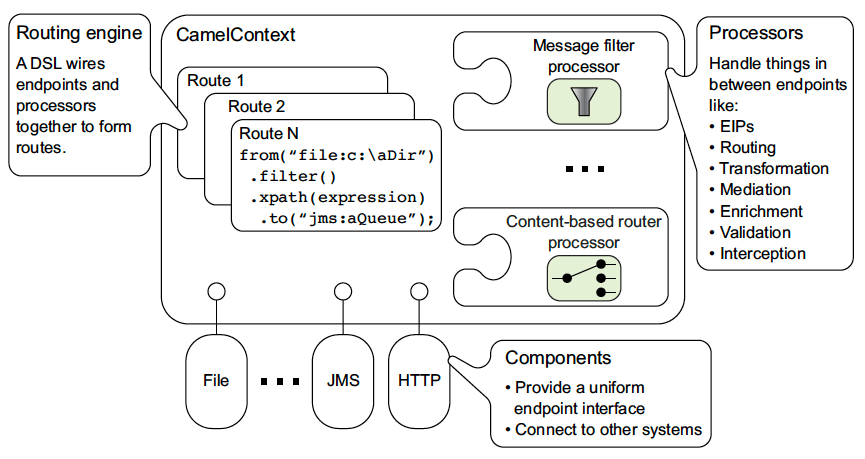
* The **Camel context** acts as the center that manages system integration.
* Within the Camel context, the **routing engine** uses a **DSL** (Domain-Specific Language) to define and create routes.
* **Routes** connect **endpoints**, which are entry and exit points for external systems, using different components.
* **Components** provide connectivity and abstraction for various protocols and technologies, such as files, HTTP, JMS, among others.
* **Messages** travel through these routes and are processed by processors, which transform and manipulate data as needed. They perform functions such as message filtering, **EIPs**, routing, transformation, mediation, enrichment, validation, and interception.
## Concepts
### Camel Context
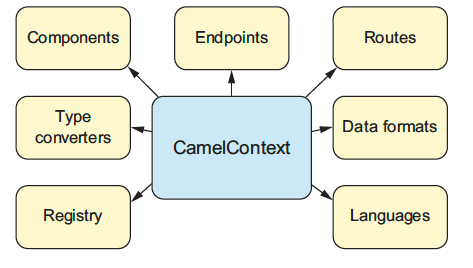
The [Camel context](https://camel.apache.org/manual/camelcontext.html) is the central core of the Camel application. It is responsible for **managing the lifecycle of routes, components, and other resources**.
### Domain-Specific Language (DSL)
A [DSL](https://camel.apache.org/manual/dsl.html), or Domain-Specific Language, is a language designed for a specific domain that **allows users to define and configure routes and integrations**.
Camel supports DSLs in various languages, such as Java, Groovy, YAML, XML, among others. In Sensedia Integrations, we use **YAML DSL** for building routes.
### Route
A [route](https://camel.apache.org/manual/routes.html) defines **the path that a message follows within the integration system**, showing the processing steps applied to the message as it travels from a source to a destination.
Generally, a route consists of a series of steps connected in a linear sequence, **detailing how the message will be handled, routed, or mediated**.
Routes are described using a simple and declarative syntax that makes them easy to read and understand.
See below an example of a Camel route in code format and diagram:
```yaml
- from:
id: from-4032
uri: rest:post:/logs
steps:
- log:
message: {{beforePost}}
- toD:
uri: http://{{supermock}}
parameters:
bridgeEndpoint: true
httpMethod: POST
- log:
message: "afterPost"
```
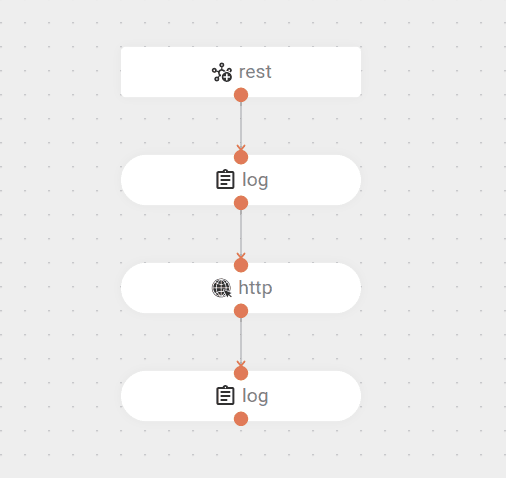
* The route starts with a REST trigger that receives `POST` requests on the `/logs` endpoint.
* Then, the route logs a message with the value `{{beforePost}}`.
* Next, it sends a `POST` request to the `http://{{supermock}}` endpoint, with the parameters:
* `bridgeEndpoint: true` and
* `httpMethod: POST`.
* Finally, it logs the message `"afterPost"`.
Check out a route [example](/docs/integrations/ipaas-example-payment).
### Message
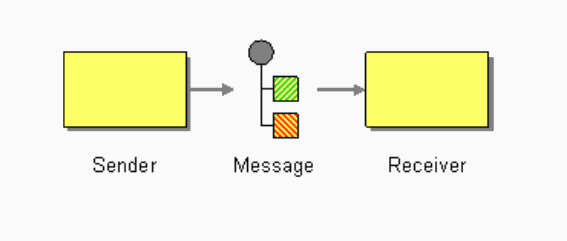
A message is **the minimum unit of data that is propagated and modified throughout a route**. It consists of two main components:
* **Header**: metadata associated with the message. Headers can include information such as identifiers, data types, or any other information relevant to message processing.
* **Body**: can be any Java object. Typically it's a string, but can be transformed into more complex objects depending on the integration encoding or components involved.
### Exchange
[Exchange](https://camel.apache.org/manual/exchange.html) is an object that **encapsulates the message and some metadata** during information exchange between systems. Additionally, it provides utility methods for use in integrations, such as the ability to save and retrieve properties.
### Endpoints
[Endpoints](https://camel.apache.org/manual/endpoint.html) are components that represent **a connection point where data can be sent or received** within an integration flow. They define how data is accessed and manipulated in a system.
Endpoints are referenced in the DSL through [URIs](https://camel.apache.org/manual/uris.html).
### Components
[Components](https://camel.apache.org/manual/component.html) are artifacts used in building a route that **enable integration and communication between different systems and protocols**. They act as connection points between Camel and the various external technologies or services you want to integrate in your routes, such as:
* **HTTP**: makes a call to an HTTP endpoint;
* **FTP**: gets or sends files to an FTP server;
* **Quartz**: generates events according to a schedule.
For more information about components, access:
* [List of Camel components (version 4.14.x)](https://camel.apache.org/components/4.14.x/index.html)
* [List of approved components for use in Sensedia Integrations](/docs/integrations/ipaas-connectors)
### Enterprise Integration Patterns (EIPs)
[EIPs](https://www.enterpriseintegrationpatterns.com/patterns/messaging/toc.html), or Enterprise Integration Patterns, are integration patterns that describe **common solutions to frequent problems found in integration systems and communication between applications**.
They help structure and optimize communication between applications by providing methods for message routing, data transformation, message aggregation and splitting, message filtering, and error handling. Examples:
* **Split**: divides a message into multiple parts for individual processing.
* **Choice**: selects a specific route based on conditions or criteria.
* **On Exception**: defines how to handle exceptions and errors during message processing.
As logic components, EIPs can be compared to the [general tools](/docs/integrations/ipaas-legacy-general-tools) used in Canvas-legacy integrations.
For more information about EIPs, access:
* [List of EIPs supported by Camel (version 4.14.x)](https://camel.apache.org/components/4.14.x/eips/enterprise-integration-patterns.html)
* [List of approved EIPs for use in Sensedia Integrations](/docs/integrations/ipaas-eips)
### Expression Languages
An [expression language](https://camel.apache.org/manual/languages.html) is a **way to write instructions in EIPs that help process and manipulate data** as they pass through an integration route.
Imagine you're moving data from one place to another, and you need to do something with that data, such as extract information, modify content, or decide where to send it. The expression language allows you to write these instructions in a way that Camel can understand and apply during the data flow.
For example, the condition for a **Choice** can be written using languages like Groovy, JSONPath, JQ, etc.
For more information about expression languages, access:
* [List of expression languages supported by Camel (version 4.14.x)](https://camel.apache.org/components/4.14.x/languages/index.html)
* [List of expression languages supported by Sensedia Integrations](/docs/integrations/ipaas-language-expressions)
### Data Formats
[Data formats](https://camel.apache.org/manual/data-format.html) are artifacts referenced by data transformation EIPs to determine the input or output format of data. They facilitate data conversion between formats such as XML, JSON, CSV, and others.
For more information about data formats, access:
* [List of data formats supported by Camel (version 4.14.x)](https://camel.apache.org/components/4.14.x/dataformats/index.html)
* Before coding, design your integration flow.
* Define the necessary steps for execution according to business rules.
* Map these steps to the necessary components and/or EIPs.
* Only then code!