---
title: c Google BigQuery
description: Available connectors
documentId: ipaas-google-bigquery
locale: en-US
---
The [**Google BigQuery**](https://camel.apache.org/components/4.10.x/google-bigquery-component.html) component allows you to connect systems to BigQuery, enabling data ingestion.
The Google BigQuery component works exclusively as a producer (connector), which means it does not allow querying BigQuery, only inserting data.
**URI Syntax**: `google-bigquery:projectId:datasetId:tableId`
## Main fields
*Path parameters*
| **Name** | **Description** | **Default** | **Type** |
|----------|----------------|------------|----------|
| `projectId` (common) | (required) Project ID in Google Cloud. | — | String |
| `datasetId` (common) | (required) Dataset ID in BigQuery. | — | String |
| `tableId` (common) | Table ID in BigQuery. | — | String |
*Query parameters*
| **Name** | **Description** | **Default** | **Type** |
|----------|----------------|------------|----------|
| `serviceAccountKey` (security)| Service account key in JSON format to authenticate an application as a service account on Google Cloud Platform. | — | String |
## Example
Before running the integration flow, import the Google Cloud service account key to a config map. This key will be used as a **resource** in the integration:
```
$ kubectl create configmap googlesa --from-file=key.json
configmap/googlesa created
```
The "key.json" file contains the service account credentials in JSON format. In Integrations, this key will be configured as a **Resource** file.
Read more about [Resources](/docs/integrations/ipaas-resources) files.
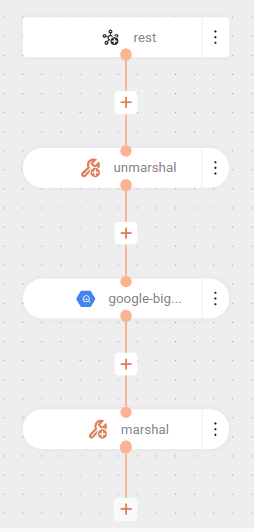
The flow below receives data through a POST request, processes the information, and sends it to Google BigQuery, performing the necessary conversions to JSON format during execution:
The flow starts with a POST request in the `/demo` endpoint.
The received data is converted from JSON (`unmarshal`) to an internal format using the Jackson library.
The data is sent to Google BigQuery:
- Table: `employees`
- Dataset: `poc_bigquery`
- Project: `registry-ipaas-testing`
- Authentication: via service key `key.json`.
The data is converted again (`marshal`) to JSON format using the Jackson library, after processing.
The Google BigQuery component receives a "List" or "Map" as input, which makes it necessary to use the "unmarshal" EIP to convert the data to the appropriate format.
```yaml
- from:
uri: rest:post:/demo
steps:
- unmarshal:
json:
library: Jackson
- to:
uri: google-bigquery://registry-ipaas-testing:poc_bigquery:employees
parameters:
serviceAccountKey: key.json
- marshal:
json:
library: Jackson
```
### cURL
**Sending a request with 1 element:**
```
curl --location 'https://demo001.a1b2c3d4e5.integrations-tst.sensedia-eng.com/demo' \
--header 'Content-Type: application/json' \
--data '{
"id": "1",
"name": "joão",
"city": "manaus"
}'
```
**Sending a request with 1 array:**
```
curl --location 'https://demo001.a1b2c3d4e5.integrations-tst.sensedia-eng.com/demo' \
--header 'Content-Type: application/json' \
--data '[
{
"id": "2",
"name": "pedro",
"city": "são paulo"
},
{
"id": "3",
"name": "rogério",
"city": "rio de janeiro"
}
]'
```