---
title: t Google Storage
description: Available triggers
documentId: ipaas-google-storage-trigger
locale: en-US
---
The [**Google Storage**](https://camel.apache.org/components/4.10.x/google-storage-component.html) component enables integration with Google Cloud Storage service, facilitating the monitoring and retrieval of objects stored in Google Cloud buckets. As a trigger, it can be configured to detect and consume files from buckets, monitor changes, and process objects automatically. The integration supports reading different file types, as well as filtering by object name and continuous processing of new items added to the bucket.
**URI Syntax**: `google-storage:bucketName`
## Main Fields
*Path parameters*
| **Name** | **Description** | **Default** | **Type** |
|----------|---------------|------------|----------|
|`bucketName` (common) |(required) Bucket name or ARN. | — |String |
*Query parameters*
| **Name** | **Description** | **Default** | **Type** |
|----------|---------------|------------|----------|
| `serviceAccountKey` (common) | The service account key that can be used as a credential for the Storage client. Can be loaded from classpath, file, or URL. | — | String |
## Example
Before running the integration flow, import the Google Cloud service account key to a config map. This key will be used as a **resource** in the integration:
```
$ kubectl create configmap googlesa --from-file=key.json
configmap/googlesa created
```
The "key.json" file contains the service account credentials in JSON format. In Integrations, this key will be configured as a **Resource** file.
Read more about [Resources](/docs/integrations/ipaas-resources) files.
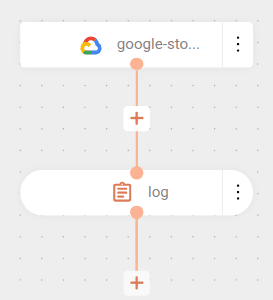
The flow continuously monitors the `sensedia-test-bucket` bucket. The credentials are in the `key.json` resource.
When it detects files in the bucket, the content and name are displayed in the log and then automatically deleted (default behavior of the `deleteAfterRead=true` parameter).
```yaml
- from:
uri: google-storage:sensedia-test-bucket
parameters:
serviceAccountKey: key.json
steps:
- log:
message: "got body ${body} and headers ${headers}"
```
### Result
```
got body Este é um teste do google Storage and headers {CamelGoogleCloudStorageBlobId=BlobId{bucket=sensedia-test-bucket, name=myfile.txt, generation=1752863351913552}, CamelGoogleCloudStorageBucketName=sensedia-test-bucket, CamelGoogleCloudStorageCacheControl=null, CamelGoogleCloudStorageComponentCount=null, CamelGoogleCloudStorageContentDisposition=null, CamelGoogleCloudStorageContentEncoding=null, CamelGoogleCloudStorageContentLanguage=null, CamelGoogleCloudStorageContentLength=34, CamelGoogleCloudStorageContentMd5=5e78d27ac034cd8cddbd23a4439d5b97, CamelGoogleCloudStorageContentType=text/plain, CamelGoogleCloudStorageCrc32cHex=e20bad0a, CamelGoogleCloudStorageCreateTime=1752863351966, CamelGoogleCloudStorageCustomTime=null, CamelGoogleCloudStorageETag=CND4uOuEx44DEAE=, CamelGoogleCloudStorageGeneration=1752863351913552, CamelGoogleCloudStorageKmsKeyName=null, CamelGoogleCloudStorageLastUpdate=Fri Jul 18 18:29:11 UTC 2025, CamelGoogleCloudStorageMediaLink=https://storage.googleapis.com/download/storage/v1/b/sensedia-test-bucket/o/myfile.txt?generation=1752863351913552&alt=media, CamelGoogleCloudStorageMetageneration=1, CamelGoogleCloudStorageObjectName=myfile.txt, CamelGoogleCloudStorageStorageClass=STANDARD}
```
- Each flow execution makes the file content available in the message body (`${body}`) and the object metadata in the headers (`${headers}`), which can be manipulated according to the integration needs.
- By default, files are deleted from the bucket after processing, as the `deleteAfterRead` parameter defaults to `true`. To keep files in the bucket, configure `deleteAfterRead: false` in the parameters.