---
title: t SMB
description: Available triggers
documentId: ipaas-smb-trigger
locale: en-US
---
The [**SMB**](https://camel.apache.org/components/4.10.x/smb-component.html) component allows you to integrate the flow with directories shared via SMB/CIFS protocol, enabling the sending of files directly to a remote server.
The integration supports sending multiple files in a single execution and allows configuring control parameters and message headers to customize the processing and routing of sent files.
**URI Syntax**: `smb:hostname:port/shareName`
## Main fields
*Path parameters*
| **Name** | **Description** | **Default** | **Type** |
|----------|---------------|------------|----------|
| `hostname` (common) | (required) The hostname or IP address of the share. | — | String |
| `port` (common) | The port number of the share. |445 | int |
| `shareName` (common) | (required) The name of the shared directory. | — | String |
| `path` (common) | Base directory within the share. | — | String |
*Query parameters*
| **Name** | **Description** | **Default** | **Type** |
|----------|---------------|------------|----------|
| `password` (security) | The password to access the share. | — | String |
| `username` (security) | The username required to access the share. | — | String |
| `delay` (scheduler) | Milliseconds before the next poll. | 500 | long |
## Example
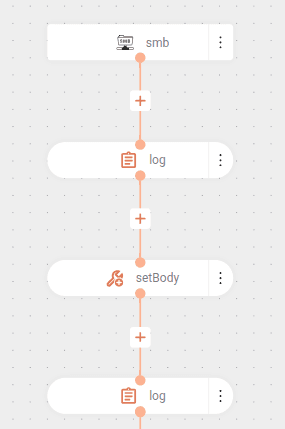
The flow below reads files from an SMB server:
The flow starts by making a connection to the SMB server using the URI `smb:ec2-18-207-116-134.compute-1.amazonaws.com:445/myshare` (server + port + share):
- Authenticates the share with `username` and `password`.
- Defines the monitored directory through the `path: "/"` parameter (root of the share).
- Configures the check interval with `delay: 60000` (checks for new files every 60 seconds).
Then, it logs the detected file, displaying the name via `${header.CamelFileName}`.
Next, it converts the SMB object to a stream using `setBody` with `${body.getInputStream()}` to make the content readable.
Finally, it displays the already converted content in another log.
```yaml
- from:
uri: "smb:ec2-18-207-116-134.compute-1.amazonaws.com:445/myshare"
parameters:
username: yourusername
password: yourpassword
path: "/"
delay: 60000
steps:
- log:
message: "Got file ${header.CamelFileName} with body ${body}"
- setBody:
simple: ${body.getInputStream()}
- log:
message: "File content: ${body}"
```
The body generated by the consumer is of type ["com.hierynomus.smbj.share.File"](https://www.javadoc.io/doc/com.hierynomus/smbj/latest/com/hierynomus/smbj/share/File.html), which does not have native integration with Camel. Therefore, the "getInputStream()" method is used to get the data stream (stream) of the content and allow its consumption.
#### Result
```
2025-10-17 18:23:40,390 INFO [route1] (Camel (camel-1) thread #2 - smb://ec2-18-207-116-134.compute-1.amazonaws.com:445/myshare) Got file with body File{fileId=SMB2FileId{persistentHandle=1b 8e e3 75 00 00 00 00}, fileName='\\ec2-18-207-116-134.compute-1.amazonaws.com\myshare\poc-smb.txt'}
2025-10-17 18:23:40,405 INFO [route1] (Camel (camel-1) thread #2 - smb://ec2-18-207-116-134.compute-1.amazonaws.com:445/myshare) File content: It worked!
```