---
title: Deploying an Integration
description: Check the step-by-step guide to deploy an integration
documentId: ipaas-flow-deploy
locale: en-US
---
To deploy an integration flow, follow the steps below:
If a deployment of the integration already exists, the system will automatically undeploy the old version before deploying the new version. To consult the deployment status, access the **Executions** screen.
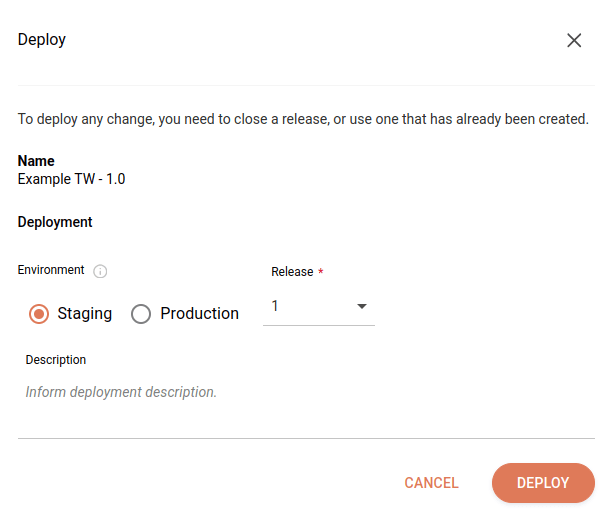
Click the rocket icon in the upper right corner of the screen.
Select the deployment environment in the **Environment** field.
Select the release you want to deploy in the **Release** field.
Write a deployment description in the **Description** field.
After deployment, the description will be available on the [Deployments](/docs/integrations/ipaas-deployments) screen in the **Deployment History** item under the _Actions_ column.
Click **DEPLOY**.
If there are variables in the integration script, their values will be automatically applied according to the selected environment (Staging or Production) during deployment.
Check the [permissions](/docs/integrations/ipaas-permissions) required to perform each action in **Sensedia Integrations**.