---
title: t Google Pub/Sub
description: Available triggers
documentId: ipaas-google-pubsub-trigger
locale: en-US
---
The [**Google Pub/Sub**](https://camel.apache.org/components/4.10.x/google-pubsub-component.html) component enables integration with the Google Cloud Pub/Sub service to publish and consume messages. It is ideal for asynchronous communication between applications, facilitating data exchange in distributed scenarios.
**URI Syntax**: `google-pubsub:projectId:destinationName`
## Main Fields
*Path parameters*
| **Name** | **Description** | **Default** | **Type** |
|----------|---------------|------------|----------|
| `projectId` (common) | (required) The Google Cloud Pub/Sub project ID. | — | String |
| `destinationName` (common) | (required) The destination name. For the consumer (trigger), this will be the subscription name, while for the producer (connector), this will be the topic name. | — | String |
*Query parameters*
| **Name** | **Description** | **Default** | **Type** |
|----------|---------------|------------|----------|
| `serviceAccountKey` (common) | The service account key that can be used as credentials for the Pub/Sub publisher/subscriber. It can be loaded by default from the classpath, but you can add the `classpath:`, `file:`, or `http:` prefix to load the resource from different systems. | — | String |
## Example
Before running the integration flow, import the Google Cloud service account key into a config map. This key will be used as a **resource** in the integration:
```
$ kubectl create configmap googlesa --from-file=key.json
configmap/googlesa created
```
The "key.json" file contains the service account credentials in JSON format. In Integrations, this key will be configured as a **Resource** file.
Read more about [Resources](/docs/integrations/ipaas-resources) files.
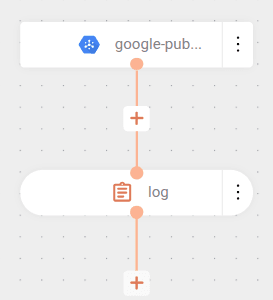
The integration subscribes to a topic (`topic-01`) through a subscription called `camel-k` and consumes messages published by another [integration](/docs/integrations/ipaas-google-pubsub):
The flow starts with the connection to Google Cloud Pub/Sub through the `google-pubsub` component. In the URI, the project ID (`registry-ipaas-testing`) and the subscription name (`camel-k`) that will be monitored to receive messages are specified.
In the parameters, the `serviceAccountKey` is configured to point to the `key.json` file, containing the service account credentials needed to authenticate the connection to Google Cloud.
The flow processes received messages through the `log` component, which records both the message content (`${body}`) and its headers (`${headers}`), allowing visualization of data received from the subscription.
A Pull-type subscription must be created in the Pub/Sub console for use in the code.
```yaml
- from:
uri: google-pubsub:registry-ipaas-testing:camel-k
parameters:
serviceAccountKey: key.json
steps:
- log:
message: "got body ${body} and headers ${headers}"
```
### cURL
```
curl --location 'http://pubsub-01.a1b2c3d4e5.integrations-tst.sensedia-eng.com/pubsub-01' \
--header 'Content-Type: application/json' \
--data 'This was a message sent by Camel-K'
```
### Result
```
[3] 2024-09-11 17:34:11,063 INFO [mai.yaml:6] (Gax-1) got body This was a message sent by Camel-K and headers {CamelGooglePubsubAttributes={attr2=value2, attr1=value1}, CamelGooglePubsubMessageId=12138744928883278, CamelGooglePubsubPublishTime=seconds: 1726076050
[3] nanos: 357000000
[3] }
```