---
title: Choice
description: Learn how to use EIPs
documentId: ipaas-eips-choice
locale: en-US
---
The **Choice** EIP routes messages based on conditions, similar to an "*if-else*" structure.
It evaluates the specified conditions and directs the message to the corresponding route.
## Configuring the Choice EIP in the Diagram
To configure a **Choice** in an integration in the **Diagram** tab, follow these steps:
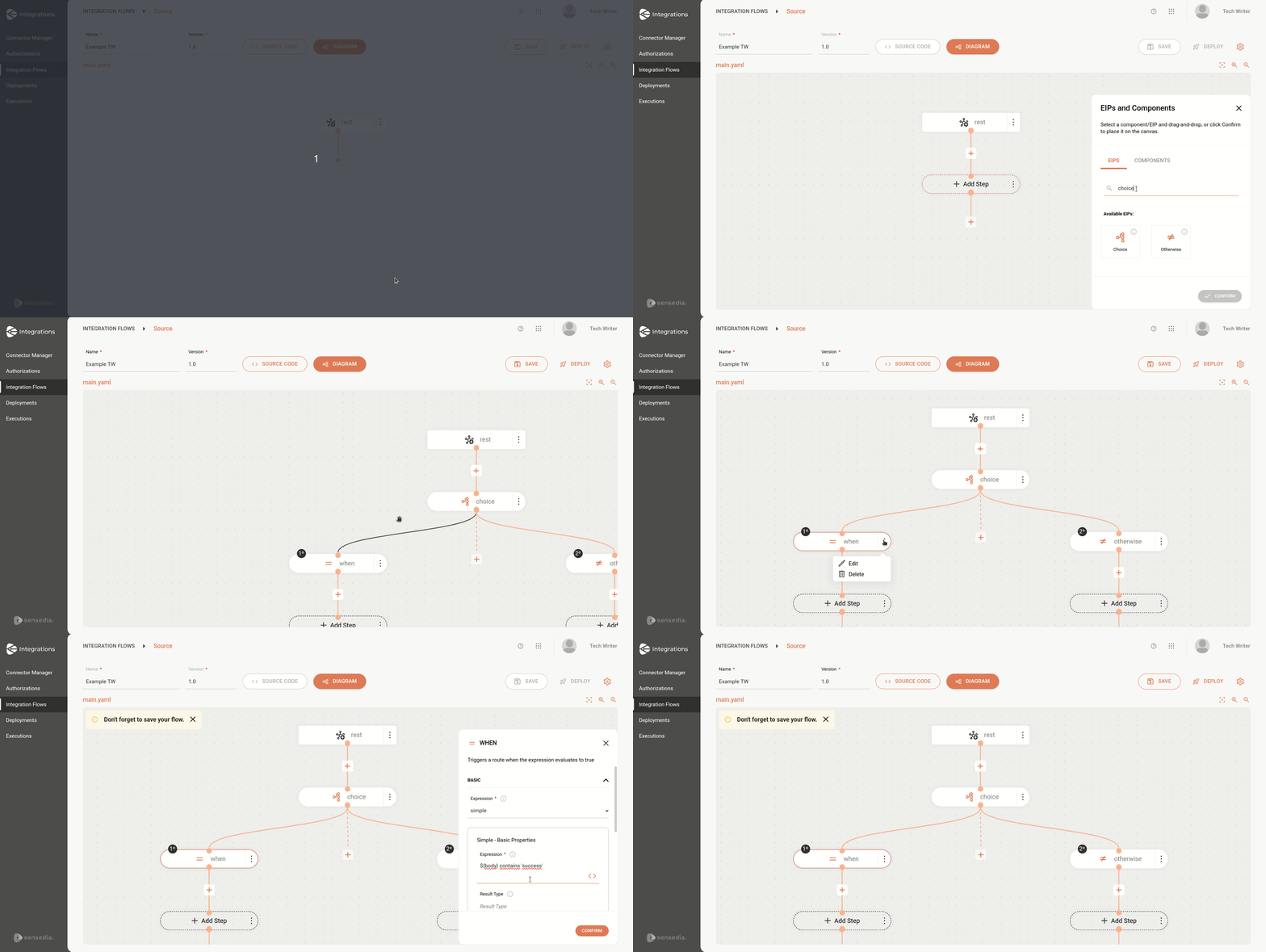
Click **+Add Step** on the canvas.
Select the **EIPs** tab.
Select the **Choice EIP**. You can use the search tool to locate it.
When adding a "Choice", two branches will be automatically created on the canvas: **When** and **Otherwise**.
You can continue adding steps after the branches, with no limit to the number of subsequent steps.
* It is possible to add new "When" and "Otherwise" conditions by clicking the **+** button, but each "Choice" can only have one "Otherwise" branch.
* The **Expression** field in the "When" condition is required and must be filled in with an expression. Learn more about [expressions](/docs/integrations/ipaas-expression-language).
The animation below shows the addition of the Choice EIP to the canvas and the "when" branch being configured to check if the message body contains the word "success":
## Choice EIP Parameters
The following parameters must be provided in the component configuration:
| Parameter | Description | Type |
|-----------|-----------|------|
| When | Defines a condition for message processing, acting as the "if" block. | List |
| Otherwise | Defines the default route, used when none of the conditions specified in "When" are met (works as the "else" block). | OtherwiseDefinition |
| Precondition | Allows evaluating the conditions defined in the branches ("When" and "Otherwise") during route initialization, instead of evaluating them dynamically at runtime. | Boolean |
## Deleting the Choice EIP or its branches
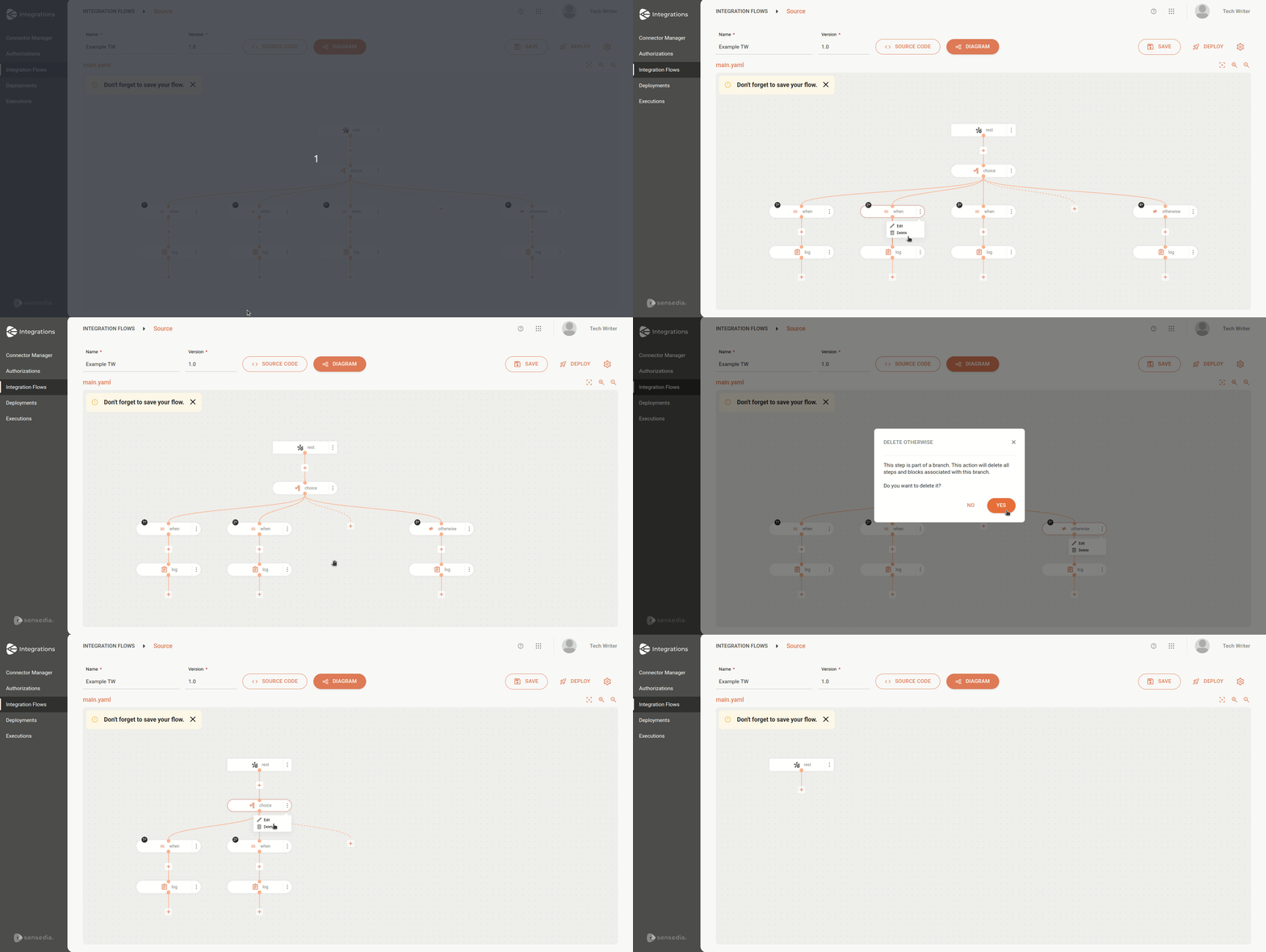
There are three deletion scenarios for the Choice EIP and its branches:
* Deletion of a "When" branch: all subsequent steps will be removed from the integration.
* Deletion of an "Otherwise" branch: all subsequent steps will be removed from the integration.
* Deletion of the Choice EIP: both the "When" and "Otherwise" branches and all subsequent steps will be removed from the integration.
## Example
Consider the integration below:
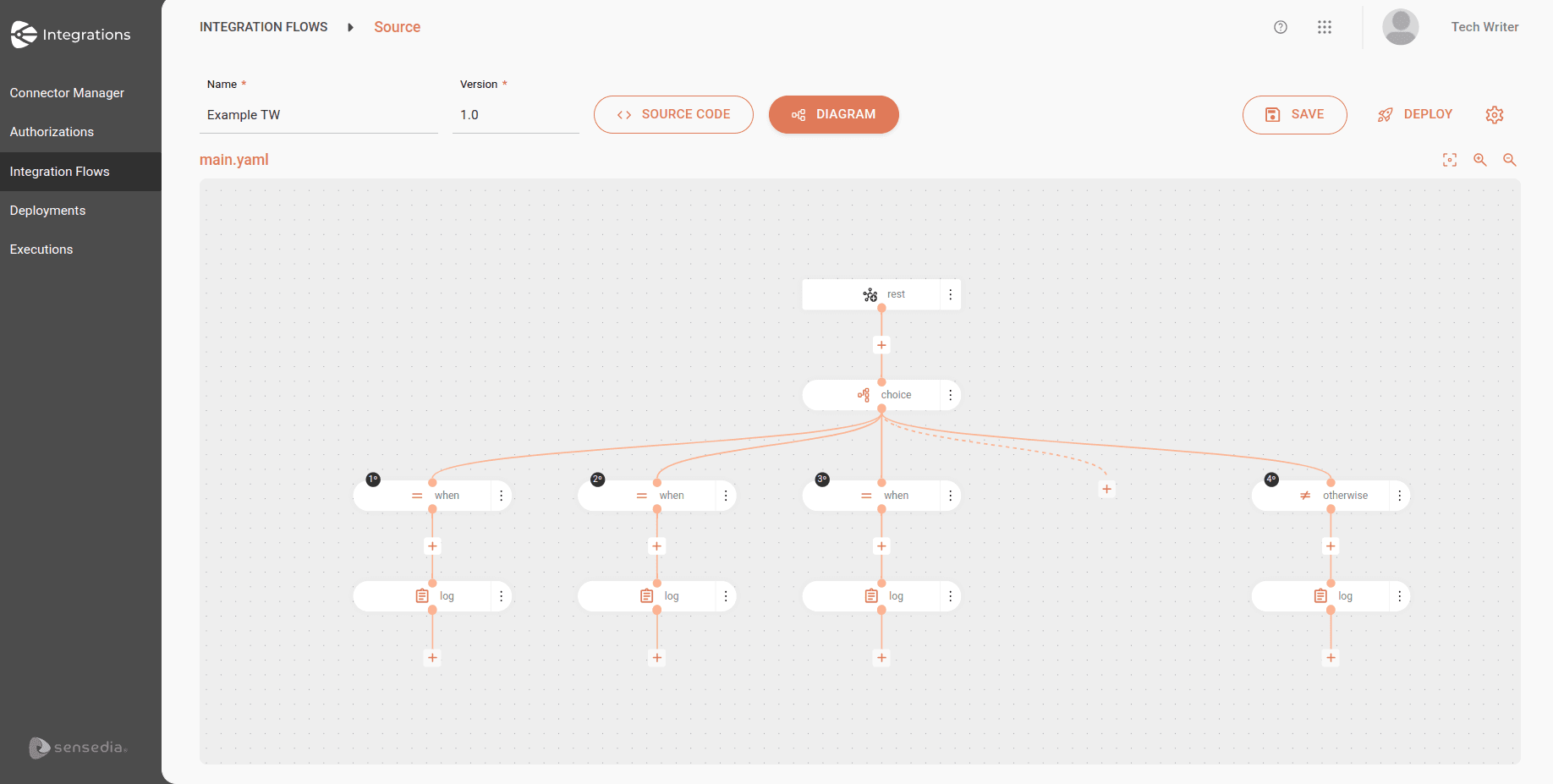
See the same integration in code format:
```yaml
- from:
uri: rest:get:hello
steps:
- choice:
when:
- expression:
simple:
expression: ${body} contains 'success'
steps:
- log:
message: "The call has been successful: ${body}"
- expression:
simple:
expression: ${body} contains 'warning'
steps:
- log:
message: "The call returned a warning: ${body}"
- expression:
simple:
expression: ${body} contains 'error'
steps:
- log:
message: "The call found an error: ${body}"
otherwise:
steps:
- log:
message: "The call returned an unknown response: ${body}"
```
Now, see the breakdown:
The flow starts with a `GET` request to the `hello` *endpoint*.
The URI is the entry point of the flow, which receives the call response in the message body (`${body}`).
**Choice**
The next step is a **Choice**, which is used to make decisions based on conditions.
Camel evaluates the conditions and executes the steps corresponding to the condition that is true.
**When**
**First condition (when)**: checks if the response body (`${body}`) contains the word "success".
If true, it executes the following:
* **Log**: logs a message indicating that the call was successful, including the response body.
```yaml
- expression:
simple:
expression: ${body} contains 'success'
steps:
- log:
message: "The call has been successful: ${body}"
```
**Second condition (when)**: checks if the response body contains the word "warning".
If true, it executes the following:
* **Log**: logs a message indicating that the call returned a warning, including the response body.
```yaml
- expression:
simple:
expression: ${body} contains 'warning'
steps:
- log:
message: "The call returned a warning: ${body}"
```
**Third condition (when)**: checks if the response body contains the word "error".
If true, it executes the following:
* **Log**: logs a message indicating that the call encountered an error, including the response body.
```yaml
- expression:
simple:
expression: ${body} contains 'error'
steps:
- log:
message: "The call found an error: ${body}"
```
**Otherwise**
If none of the previous conditions are met, the **Otherwise** step will be executed, that is, if the response body does not contain "success", "warning", or "error".
* **Log**: logs a message indicating that the call returned an unknown response, including the response body.
```yaml
otherwise:
steps:
- log:
message: "The call returned an unknown response: ${body}"
```