---
title: Expression Languages
description: Consult the expression languages available for use
documentId: ipaas-expression-language
locale: en-US
---
An expression language is a way to define conditions or manipulate messages in a declarative manner.
They are used to evaluate and manipulate data within a message, allowing the creation of more complex and flexible routes.
See how to add an expression language directly through an EIP form in the **Diagram** tab:
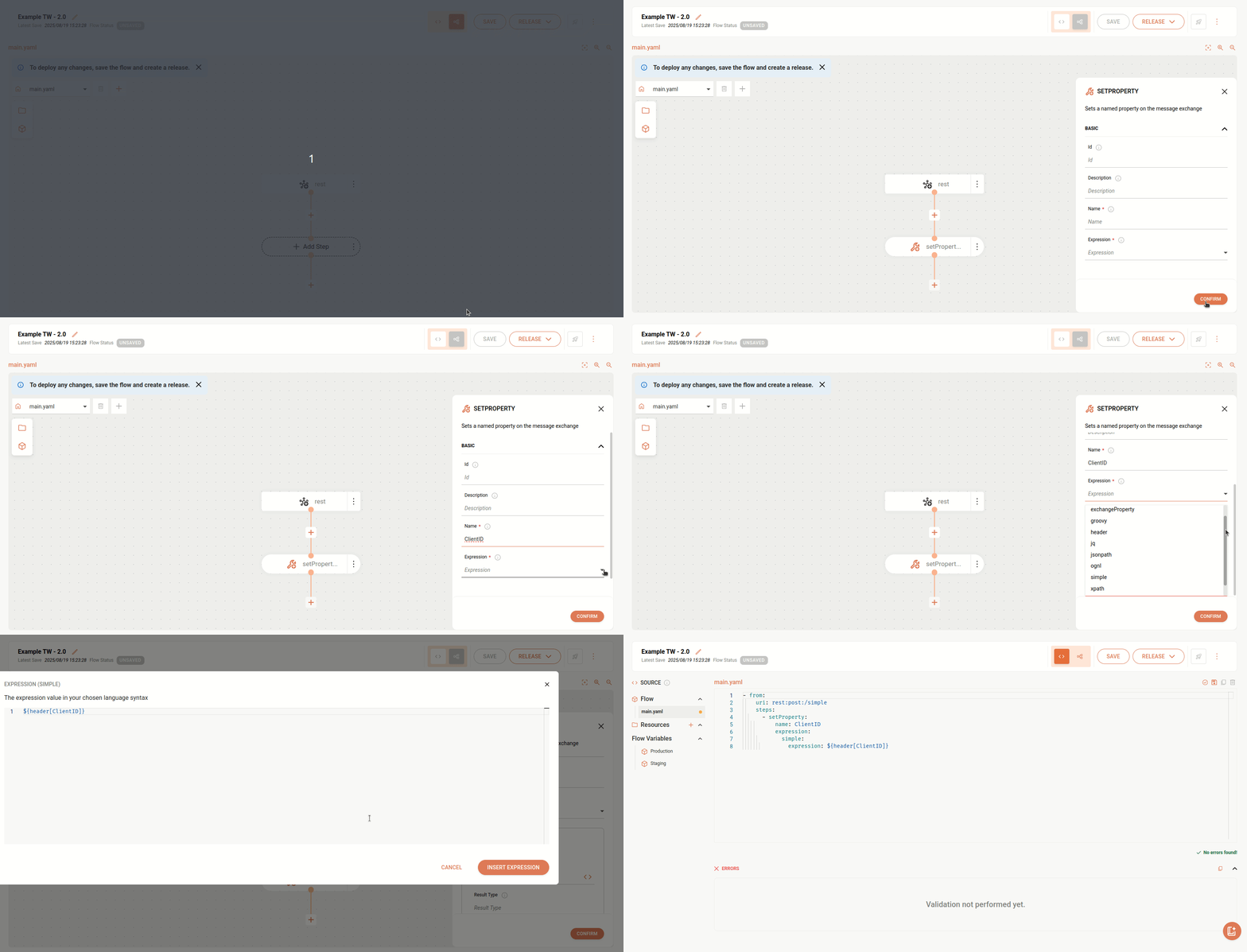
Here are the expression languages supported by **Sensedia Integrations**:
The examples show the use of languages in the **Choice** component, but they can be used in any context that supports languages.
* **Constant**: returns a constant value.
```yaml
- from:
uri: rest:post:/demo
parameters: {}
steps:
- choice:
otherwise:
steps:
- log:
message: 'Otherwise activated'
when:
- expression:
constant:
expression: 'sensedia'
steps:
- log:
message: 'When activated'
```
* **ExchangeProperty**: accesses Exchange properties.
```yaml
- from:
uri: rest:post:/demo
parameters: {}
steps:
- choice:
otherwise:
steps:
- log:
message: 'Otherwise activated'
when:
- expression:
exchangeProperty:
expression: 'myproperty'
steps:
- log:
message: 'When activated'
```
* **Groovy**: uses Groovy scripts to manipulate messages.
```yaml
- from:
uri: rest:post:/demo
parameters: {}
steps:
- choice:
otherwise:
steps:
- log:
message: 'Otherwise activated'
when:
- expression:
groovy:
expression: 'Math.random() > 0.5'
steps:
- log:
message: 'When activated'
```
* **Header**: accesses message header values.
```yaml
- from:
uri: rest:post:/demo
parameters: {}
steps:
- choice:
otherwise:
steps:
- log:
message: 'Otherwise activated'
when:
- expression:
header:
expression: 'myheader'
steps:
- log:
message: 'When activated'
```
* **JQ**: uses the JQ language to query and manipulate JSON.
```yaml
- from:
uri: rest:post:/demo
parameters: {}
steps:
- choice:
otherwise:
steps:
- log:
message: 'Otherwise activated'
when:
- expression:
jq:
expression: '.store.book.price < 30'
steps:
- log:
message: 'When activated'
```
* **JSONPath**: similar to XPath, but for JSON.
```yaml
- from:
uri: rest:post:/demo
parameters: {}
steps:
- choice:
otherwise:
steps:
- log:
message: 'Otherwise activated'
when:
- expression:
jsonpath:
expression: $.model.Details[?(@['Random nonsense'] == 'New today')]
steps:
- log:
message: 'When activated'
```
* **OGNL**: uses Object-Graph Navigation Language expressions to access data.
```yaml
- from:
uri: rest:post:/demo
parameters: {}
steps:
- choice:
otherwise:
steps:
- log:
message: 'Otherwise activated'
when:
- expression:
ognl:
expression: 'request.headers.foo == "bar"'
steps:
- log:
message: 'When activated'
```
* **Simple**: a simple language for expressions and manipulations.
```yaml
- from:
uri: rest:post:/demo
parameters: {}
steps:
- choice:
otherwise:
steps:
- log:
message: 'Otherwise activated'
when:
- expression:
simple:
expression: ${header.id} == 2
steps:
- log:
message: 'When activated'
```
* **XPath**: used to query and manipulate XML.
```yaml
- from:
uri: rest:post:/demo
parameters: {}
steps:
- choice:
otherwise:
steps:
- log:
message: 'Otherwise activated'
when:
- expression:
xpath:
expression: '/person/@id > 30'
steps:
- log:
message: 'When activated'
```
* **XQuery**: uses XQuery to query and manipulate XML.
```yaml
- from:
uri: rest:post:/demo
parameters: {}
steps:
- choice:
otherwise:
steps:
- log:
message: 'Otherwise activated'
when:
- expression:
xquery:
expression: '//foo/id > 30'
steps:
- log:
message: 'When activated'
```
For more details, access [the official Apache Camel documentation](https://camel.apache.org/components/4.8.x/languages/index.html).