---
title: Choice v1
description: Learn about Choice
documentId: ipaas-legacy-choice
locale: en-US
---
The **Choice** tool is a *step* that performs a flow diversion within an integration based on conditions you can configure.
This *step* is part of the general tools that help organize integration flows.
Below, learn how to add it to the canvas, configure its form, and understand what configurations are required.
## Add Choice to the canvas
Click the  icon in the left editing menu.
Select **Choice** to add it to the canvas. You can use the search bar  to find it.
You can add **Choice** more than once. In this case, each time the tool is added, a number is appended to the name (Choice 1, Choice 2, Choice 3).
Connect **Choice** to the flow *steps*. This tool can connect with one previous *step* and any subsequent *step*.
To delete **Choice** from the canvas, select it and click the  button.
## Configure the form
Select **Choice** on the canvas.
Click the edit icon .
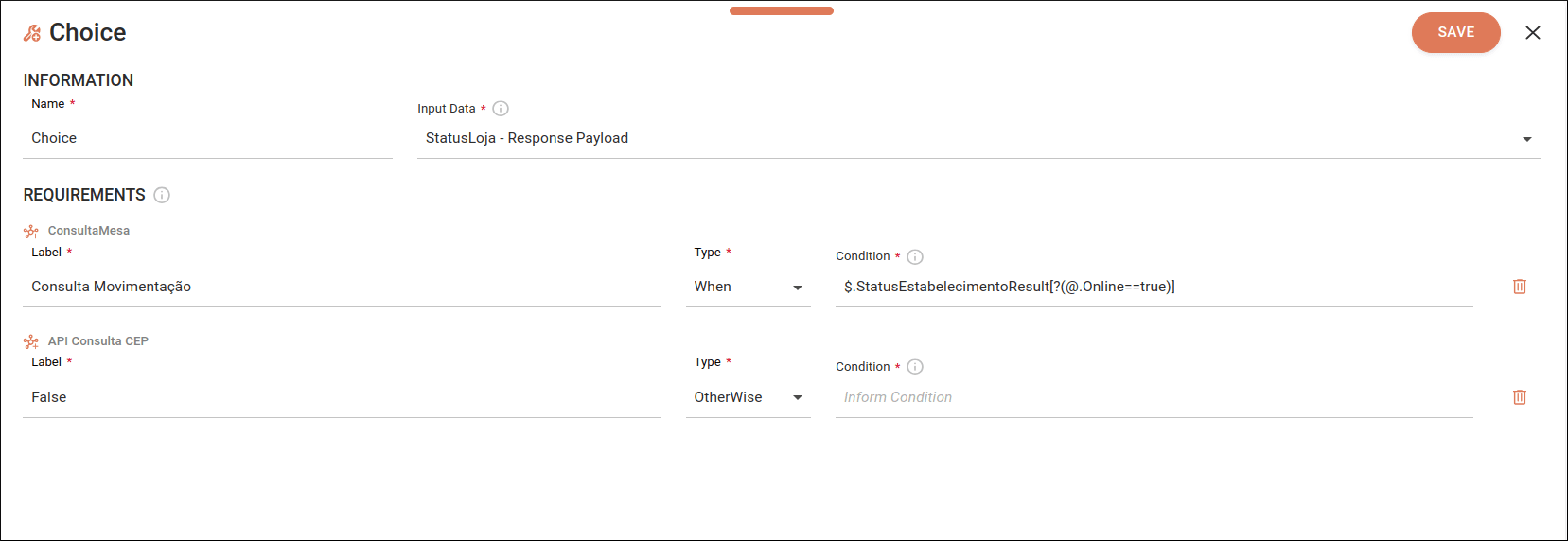
Fill in the following form fields:
* **Name**: enter a unique name for the *step*. By default, you will see "Choice". Alphanumeric field that allows special characters and empty spaces, with a limit of 20 characters.
* **Input Data**: select the *step* to apply the condition. You will see the *request* and *response* data from the *connectors* and the *request* data from the *trigger*.
* **Label**: enter a name that identifies the diversion. Alphanumeric field that allows special characters and empty spaces, with a limit of 50 characters.
* **Type**: select an option:
* **WHEN**: defines a condition that creates a diversion in your integration flow to a specific execution line.
* **OTHERWISE**: is executed when none of the **WHEN** conditions are met.
* **Condition**: enter the condition to be applied in the *step*. Use JSONPath format. Alphanumeric field that allows special characters and empty spaces, with a limit of 1024 characters. There is no limit on conditions.
To create a condition, visit the [Creating a condition in JSONPath](/docs/integrations/ipaas-legacy-jsonpath) page.
Click **SAVE**.
### Required configurations
****
The alert icon  on **Choice** only disappears if there is:
* The input connection on the left.
* At least one output connection on the right.
* A **WHEN** condition.
* An **OTHERWISE** condition.
****
When deleting a **WHEN** connection between *steps*, the **Choice** configuration form will open automatically, allowing you to reconfigure or remove the disconnected condition.