---
title: Scheduler
description: Learn about the Scheduler trigger
documentId: ipaas-legacy-scheduler-trigger
locale: en-US
---
With the **Scheduler** trigger, you can schedule the integration flow execution for a defined time period.
Next, learn how to add it to the canvas and configure its form.
## Add Scheduler to the canvas
Click on the  icon in the left editing menu;
Select **Scheduler**.
The  **Start** is replaced by the *trigger* as soon as you add it to the canvas.
Configure its form.
To delete the **Scheduler** from the canvas, select it and click the  button.
Deleting the trigger will disable the **Test Mode** function.
## Configuring the form
Select the trigger on the canvas.
Click the edit icon .
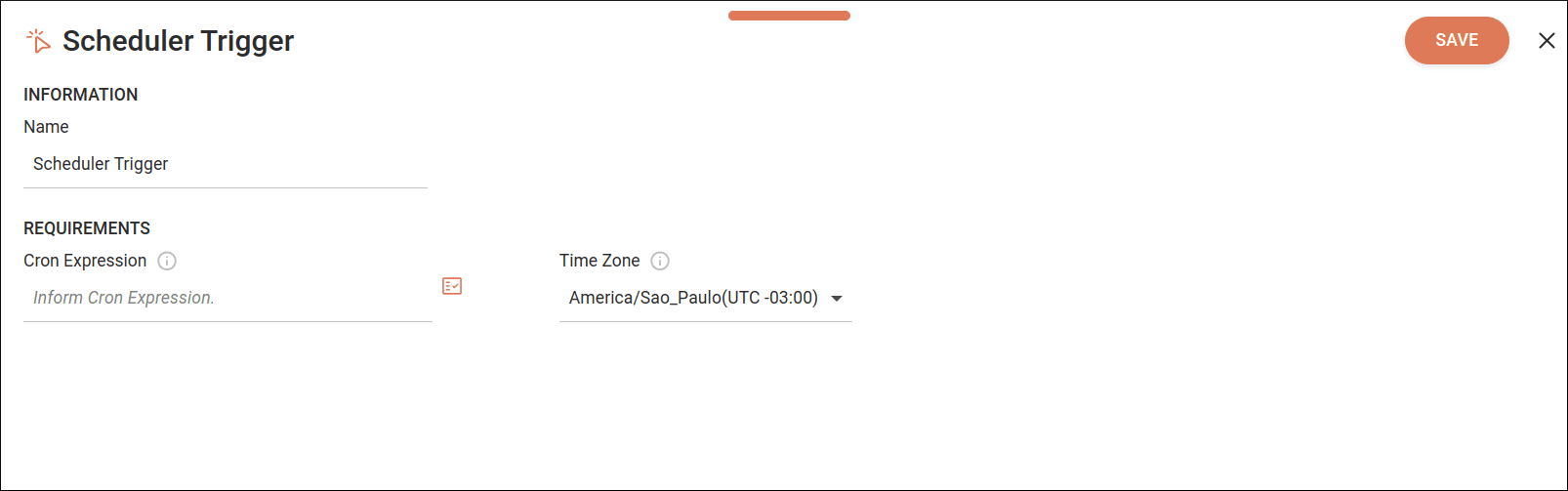
Fill in the following form fields:
* **Name**: enter the trigger name. The name cannot be used more than once in the same integration flow. By default, the field displays the name **Scheduler Trigger**.
* **Cron Expression**: establish a recurrence pattern in the integration flow execution. Understand how a [Cron Expression](#cron-expression) works.
****
By clicking the **Properties** icon  on the right, you can:
1. Select previously registered variables.
2. Select input or output *payloads* from previous *steps*.
3. Create expressions using the Expression Builder.
Read more about [**Properties and Expression Builder**](/docs/integrations/ipaas-legacy-expression-builder).
****
* **Time Zone**: select the time zone. You can type or filter available options. The default time zone is UTC.
Click **SAVE** to save changes. To exit the form without saving them, click the **X** in the upper right corner.
## Cron expression
A cron expression is a *string* that defines a **periodic schedule** following a specific format.
The **Cron Expression** field accepts schedules composed of the following fields:
```
```
### How to configure a cron expression
See below the special characters and values you can use in each field of the cron expression:
**Minute**
| Symbol | Description |
|---------|-----------|
| * | any value |
| , | value list separator (only specified values) |
| - | value range (all values included in the range) |
| / | incremental values (the number before the slash specifies when the interval starts and the number after the slash is the interval) |
| 0-59 | allowed values |
**Hour**
| Symbol | Description |
|---------|-----------|
| * | any value |
| , | value list separator (only specified values) |
| - | value range (all values included in the range) |
| / | incremental values (the number before the slash specifies when the interval starts and the number after the slash is the interval) |
| 0-23 | allowed values |
**Day of month**
| Symbol | Description |
|---------|-----------|
| * | any value |
| , | value list separator (only specified values) |
| - | value range (all values included in the range) |
| / | incremental values (the number before the slash specifies when the interval starts and the number after the slash is the interval) |
| 1-31 | allowed values |
**Month**
| Symbol | Description |
|---------|-----------|
| * | any value |
| , | value list separator (only specified values) |
| - | value range (all values included in the range) |
| / | incremental values (the number before the slash specifies when the interval starts and the number after the slash is the interval) |
| 1-12 | allowed values |
| JAN-DEC | individual alternative values |
**Day of week**
| Symbol | Description |
|---------|-----------|
| * | any value |
| , | value list separator (only specified values) |
| - | value range (all values included in the range) |
| / | incremental values (the number before the slash specifies when the interval starts and the number after the slash is the interval) |
| 0-6 | allowed values |
| SUN-SAT | individual alternative values |
To generate a cron expression, visit [Crontab guru](https://crontab.guru/).
### Examples
See some examples of cron expressions:
| Minute | Hour | Day of month | Month | Day of week | Meaning |
|--------|------|------------|-----|---------------|-------------|
| 30 | 10 | * | * | * | Every day at 10:30 |
| 0 | 15 | 15 | JUN | * | At 15:00 on June 15 |
| 0 | 17 | * | * | 6,0 | At 17:00 on Saturdays and Sundays |
| 0 | * | * | * | * | Every hour |
| 0 | 0 | * | * | * | Once a day |
| 0 | */2 | * | * | * | Every 2 hours |
| 0 | 10/3 | * | * | TUE | Every 3 hours starting at 10:00 on Tuesday |