---
title: Permission Configuration
description: Permissions and access control system in Sensedia Integrations
documentId: ipaas-permissions
locale: en-US
---
## Basic concepts
The following definitions are fundamental to understanding how permissions work in **Sensedia Integrations**:
* **Resource:** represents a functional area of the system, such as `Authorizations`, `Connectors`, `Deployments`, etc.
* **Permission:** specific action allowed on the resource, such as create, delete, list, update, view, etc.
* **Role:** set of permissions assigned to a user to define their access level.
Each user must have an associated role, with the definition of their permissions in the system.
This means it is possible to have more detailed control over the actions each user can perform on each resource.
In addition to defining whether a user can view and/or edit a specific resource, it is also possible to specify whether they can list, create, update, and/or delete resources.
Integrations has 3 [pre-defined](https://docs.sensedia.com/access-control-guide/default-policies#integrations) roles with different permission levels:
* **Integrations Admin**
* **Super Admin**
* **Read-only**
You can also [create new roles](https://docs.sensedia.com/access-control-guide/policies#create_policy) and define the permissions they will have.
Configure permissions and roles directly in **Access Control**.
Check the [documentation](https://docs.sensedia.com/access-control-guide/policies) for more details.
## Available permissions in Sensedia Integrations
Following are the permissions available in **Integrations** organized by resource:
### AI Copilot
| Permission | Description |
|---|---|
| Use AI Chat for Source Code Generation | Allows using the AI Copilot chat to create CAMEL YAML DSL scripts. |
### Authorizations
| Permission | Description |
|---|---|
| Create and update authorizations | Allows creating and editing authorizations. |
| Delete authorizations | Allows deleting authorizations. |
| List authorizations | Allows listing existing authorizations. |
| List and view authorizations | Allows listing and viewing details of an authorization. |
### Connectors
| Permission | Description |
|---|---|
| Create and update connectors | Allows creating and editing connector configurations. |
| Delete connectors | Allows deleting a connector. |
| List connectors | Allows listing existing connectors. |
| List and view connectors | Allows listing and viewing connector details and configurations. |
### Data Sources
| Permission | Description |
|---|---|
| Create data source | Allows creating, editing, listing, and viewing data sources. |
| List data sources | Allows listing existing data sources. |
| List and view data sources | Allows listing and viewing details of a data source. |
| Delete data sources | Allows deleting data sources.
### Deployments
| Permission | Description |
|---|---|
| Deploy and undeploy flows | Allows deploying and removing integration flows in all environments. |
| List deployments | Allows listing existing deployments. |
| View history, environment variables, and configurations | Allows viewing flow execution history, environment variables, and deployment configurations in all environments. |
### Executions
| Permission | Description |
|---|---|
| List executions | Allows viewing the *status* and *logs* of integration flow executions. |
### Integration Flows
| Permission | Description |
|---|---|
| Create and update integration flows | Allows creating and editing integration flows. |
| Delete integration flows | Allows deleting integration flows. |
| List integration flows | Allows listing existing integration flows. |
| List and view integration flows | Allows listing and viewing details of integration flows. |
### Releases
| Permission | Description |
|---|---|
| Create integration flow releases | Allows creating, listing, and viewing *releases* (versions of an integration). |
| Delete release in integration flow | Allows deleting a *release*. |
| List and view integration flow releases | Allows listing and viewing *releases*. |
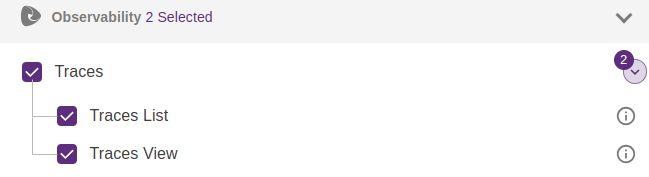
In addition to the permissions above, enable the **trace viewing permission**.
To do this, when assigning permissions to a user's role in **Access Control**:
* Select the **Observability** permission grouper.
* Select the permissions:
* Traces
* Traces List
* Traces View
The trace viewing option is only visible for executions performed after the traces feature has been enabled.
See how to [create a role and enable permissions in Access Control](https://docs.sensedia.com/access-control-guide/policies#create_policy).