---
title: t Quartz
description: Available triggers
documentId: ipaas-quartz-trigger
locale: en-US
---
The [**Quartz**](https://camel.apache.org/components/4.8.x/quartz-component.html) component allows you to schedule and trigger events based on cron expressions. It enables you to configure tasks to be triggered at regular times, such as every minute, hour, or day, using standard cron syntax.
See [Cron](#cron) trigger.
**URI Syntax**: `quartz:groupName/triggerName`
## Main fields
*Path parameters*
| **Name** | **Description** | **Default** | **Type** |
|----------|---------------|------------|----------|
|`groupName` (consumer)| The Quartz group name to use. The combination of group name and trigger name should be unique. | Camel | String |
|`triggerName` (consumer) | (required) The Quartz trigger name to use. The combination of group name and trigger name should be unique. | — | String |
*Query parameters*
| **Name** | **Description** | **Default** | **Type** |
|----------|---------------|------------|----------|
| `cron` (consumer) | Specifies a cron expression to define when the trigger should fire. | — | String |
| `triggerParameters` (advanced) | To configure additional options on the trigger. The `timeZone` parameter is supported when the cron option is present. Otherwise, the `repeatInterval` and `repeatCount` parameters are supported. This is a multi-value option with the prefix: `trigger`. | — | Map |
### Examples
**Example 1**
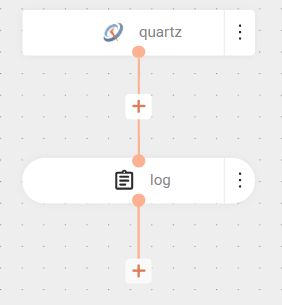
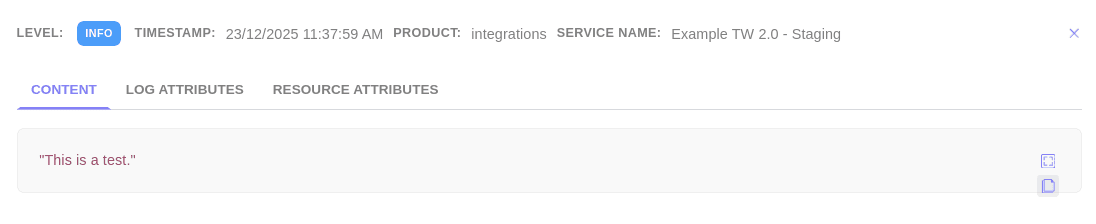
The flow uses the Quartz component with a cron expression (`59+*+*+*+*+?`) that runs every minute at second 59. The trigger is identified by the name `quartz-trigger` in the URI.
Each time the schedule fires, a "This is a test" message is logged.
```yaml
- from:
uri: "quartz://test?cron=59+*+*+*+*+?"
steps:
- log:
message: This is a test.
```
#### Result
**Example 2**
With Quartz, you can explicitly set the time zone used for scheduling tasks. This configuration is important because the same time configured in a cron expression can represent different moments depending on the considered time zone.
Consider the same instant represented in different locations and the following code snippet:
| Location | Time |
|------------|--------|
| Brasilia | 3 p.m |
| UTC | 6 p.m |
| Brussels | 7 p.m |
```yaml
- from:
uri: quartz:/inbox
parameters:
cron: 0+21+19+?+*+MON-FRI
steps:
- to:
uri: log:com.mycompany.order
parameters:
multiline: true
showAll: true
```
* **Scheduling without specifying a time zone**
When you do not specify a time zone in the Quartz URI, the schedule defaults to UTC:
```yaml
- from:
uri: quartz:/inbox
parameters:
cron: 0+21+19+?+*+MON-FRI
```
In this case, the log displays the following message:
`Next fire date is 2024-02-28T19:21:00.000+0000`
This means Quartz interpreted the cron expression as 19:21 (7:21 p.m) in UTC, since no time zone was specified.
* **Scheduling with a specified time zone**
Now, by adding the time zone parameter, for example `Europe/Brussels`, Quartz interprets the cron expression based on this time zone:
```yaml
- from:
uri: quartz:/inbox
parameters:
cron: 0+21+19+?+*+MON-FRI
trigger.timezone: Europe/Brussels
```
The log now displays:
`Next fire date is 2024-02-28T18:21:00.000+0000`
If you add the parameter `trigger.timeZone=Europe/Brussels`, Quartz adjusts the schedule to Brussels time. Thus, the log shows the next trigger at 18:21 UTC (6h21 p.m), which corresponds to 19:21 (7h21) in Brussels time.
For the time zone configuration to work correctly in Quartz, the schedule must use the **cron** option. The `trigger.timeZone` parameter is only applied when cron is present, ensuring execution occurs at the expected time for the configured time zone.