- Home
- ...
- Data Streaming
- Details and Features of Data Streaming
Data Delivery
Data Streaming uses different technologies to export data, and the delivery reliability can vary depending on the format and destination chosen.
-
Export via OpenTelemetry (OTLP) When exporting data in OTLP format to destinations such as Dynatrace, Datadog, or AWS S3, inherent completeness limitations from the OpenTelemetry model may occur. This format is better suited for observability scenarios (such as performance monitoring and event tracing), where analyses based on samples are usually sufficient to identify failures and anomalies. It is not suitable for business data that requires integral precision.
-
Export in JSON format Exporting data in JSON format generally offers a more reliable delivery rate. This option is recommended for situations where data integrity has a higher priority, but even so, we do not recommend it for use in critical decision-making systems that depend on 100% of the data for correct operation.
NOTEThe JSON file sent is compressed in gz format.
TIPSee also: Data Streaming usage limits.
Observability vs. Data Analysis
Understand the difference between the two concepts that, although related, have distinct goals:
-
Observability: tracks system behavior and health in real time. It uses telemetry data, such as metrics, logs, and traces, and performs analyses through intelligent sampling, which can reduce the data volume when everything is operating normally. The pipeline is optimized for speed and efficiency, prioritizing rapid problem detection.
-
Data Analysis (Analytics): focuses on understanding the business and user behavior. It uses historical data for detailed analyses, report generation, and strategic decision-making. The pipeline prioritizes comprehensiveness.
IMPORTANT
Data Streaming and Sensedia Analytics process data through different pipelines, which can impact the volume and granularity of the available information.
Temporary interruptions in networks, messaging systems, or service providers can create gaps in observability, reinforcing the difference between observational and analytical data.
Trace Data and Dimensions
The traces sent in OTLP format are generated on the Sensedia gateway itself. This means they are separated from any distributed trace that your client application may have generated. Currently, we only send the trace dimension.
IMPORTANTData Streaming exports only the data (traces) generated by the Sensedia API Gateway. The feature does not yet send data from other platform functionalities.
NOTEResponses with HTTP status codes from 400 to 599 are sent with the root span status set to ERROR. All other responses are sent with no status, and each destination tool applies its own default. Since the range includes 4xx codes, client errors also count toward the error rate at the destination.
Examples
See examples of what the file generated and sent to different destinations looks like.
-
OTLP Example
See an example of a file in OTLP format, sent to AWS S3:
-
JSON Example
See an example of a file exported in JSON format for S3, Azure Blob, or GCS:
NOTEThe example above has been reduced for easier reading. In real files, the fields trace, requestHeaders, and responseHeaders may contain more extensive information. If you prefer, you can download a complete example file in JSON format here.
-
Folder Structure
The directory structure varies by storage provider. In the case of AWS S3 (JSON), Azure, and Google Cloud, the organization follows the pattern:
Example:
{internal_identifier}= Sensedia control point.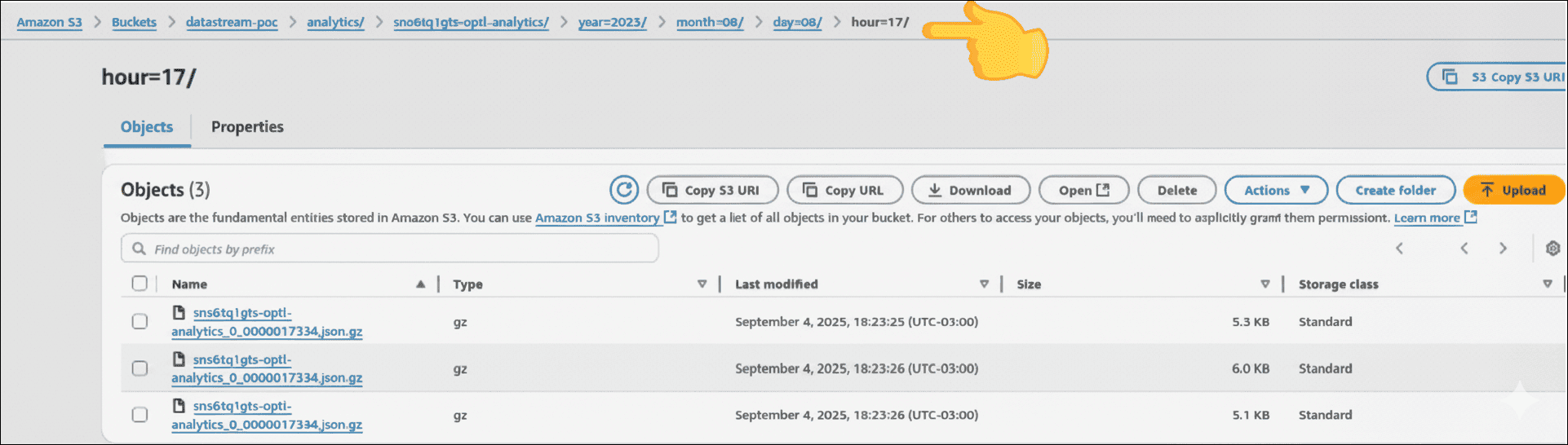
-
Responsibility matrix
Data Streaming delivers your data to the destination you configure. The destination environment, whether an APM, observability, or storage platform, is provisioned, sustained, and controlled by you. The table below summarizes what is Sensedia's responsibility and what is yours.
* Through a support ticket.
** Delivery is best effort. After the retry attempts, undelivered data is discarded and there is no reprocessing.
*** With the platform vendor.
IMPORTANTUnavailability, rejections, or losses that occur in the destination environment are outside Sensedia's scope of responsibility.